
As of November 2026, Checkfront's pricing page advertises one plan: $99 a month plus a 3% online booking fee. You choose whether your customer pays the 3% on top or you absorb it, and bookings you take offline carry no booking fee. Card processing is extra. In the US, Checkfront's own payment service charges 2.9% + 30¢ on domestic cards, 3.9% + 30¢ on international cards and 3.4% + 30¢ on American Express. On a $100 booking with the fee absorbed, you keep $93.80, before the monthly fee.
Below is each Checkfront charge, what it adds up to in a typical month, who Checkfront suits, and how it compares with taking bookings on your own website.
Checkfront pricing, line by line
- Subscription: $99 a month. Checkfront says prices may vary by region and currency, and there are no setup fees.
- Online booking fee: 3% of each booking your customers pay for through Checkfront, including products and gift certificates. By default it's added to the customer's invoice as its own line. You can make it inclusive, so it comes out of your price, and you can hide it from guests.
- No booking fee on offline bookings, imported bookings, or bookings from travel sites such as Viator and GetYourGuide, which pay those sites' own commission instead.
- Card processing, through Checkfront Payments in the US: 2.9% + 30¢ for domestic cards, 3.9% + 30¢ for international cards, 3.4% + 30¢ for American Express. Checkfront Payments is required for the booking fee plan.
- Refunds: no charge to refund, but the original card fee isn't returned.
- Deposits: on plans with the booking fee, customers must pay at least 10% upfront.
Checkfront's help center also mentions other plans, including a Growth plan with a subscription instead of the booking fee and a Managed plan, plus older plans existing customers can keep. None of those is priced publicly, and Checkfront says your exact booking fee percentage is shown on your billing page.
Sources: Checkfront's pricing page and its help articles on Checkfront Payments pricing and booking fees, checked November 2026.
What Checkfront takes from a $40, $100 and $200 booking
With the booking fee passed on, your customer pays 3% more and the card fee is charged on the larger total. With it absorbed, your customer pays your price. These use Checkfront Payments' US domestic card rate and leave out the $99 subscription.
| Booking | Fee passed on: customer pays | Fee passed on: you keep | Fee absorbed: you keep |
|---|---|---|---|
| $40 | $41.20 | $38.51 | $37.34 |
| $100 | $103.00 | $96.71 | $93.80 |
| $200 | $206.00 | $193.73 | $187.90 |
What a month on Checkfront adds up to
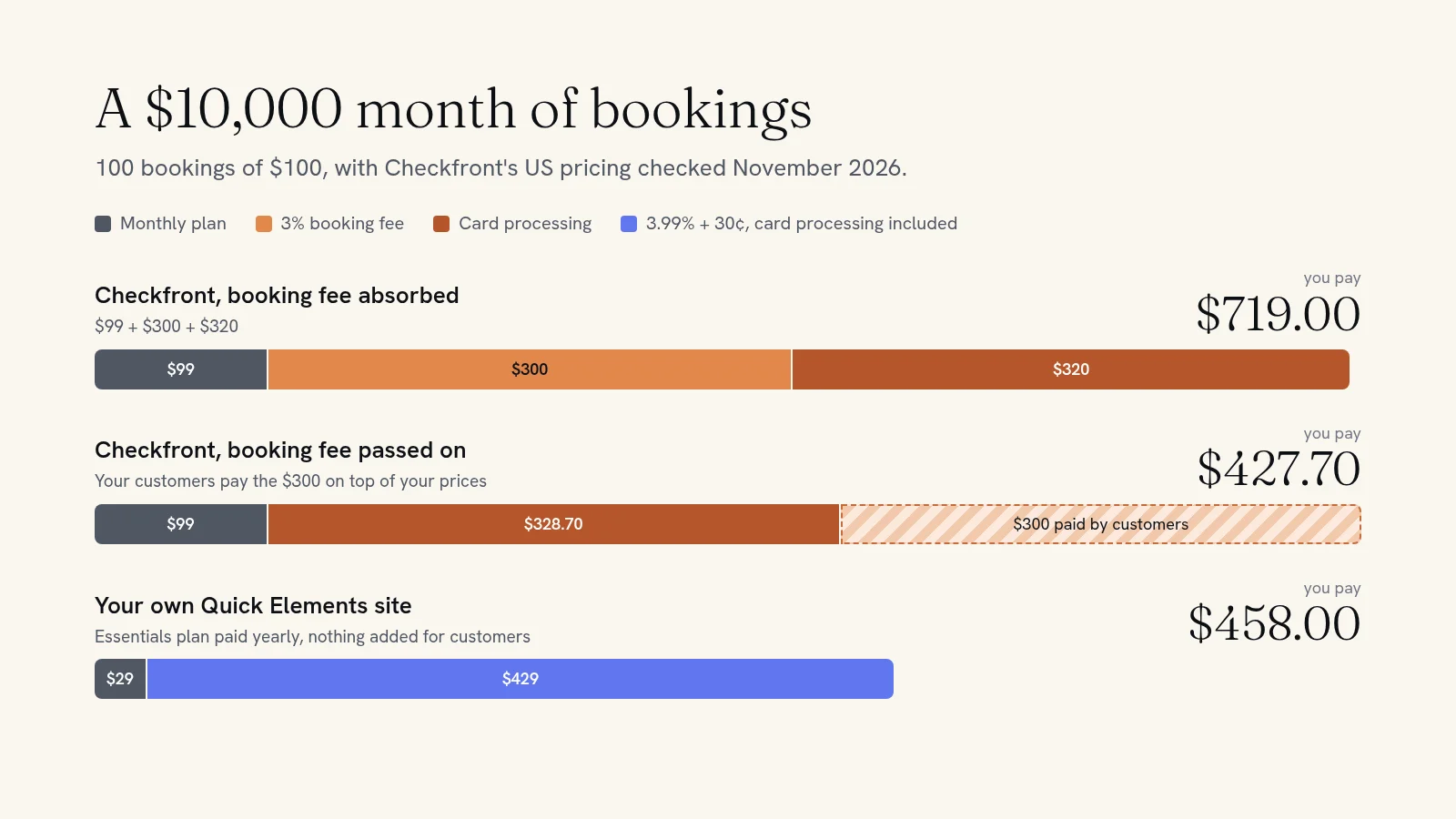
The monthly fee matters more for a small business than the percentages. Say you take $10,000 a month online, as 100 bookings of $100 each.
| Checkfront, fee absorbed | Checkfront, fee passed on | Your own Quick Elements site | |
|---|---|---|---|
| Monthly plan | $99.00 | $99.00 | $29.00 |
| Booking fee | $300.00 | $0 (your customers pay $300) | None |
| Card processing | $320.00 | $328.70 | $429.00, card processing included |
| You pay | $719.00 | $427.70 | $458.00 |
If you absorb the booking fee, Checkfront costs about $261 a month more than your own site in this example. If you pass it on, Checkfront costs you about $30 less, and your customers pay $300 more between them. Which matters more depends on how much your customers compare prices.
At lower volumes the $99 does the damage. At $2,000 a month in bookings, Checkfront's monthly fee alone is about 5% of your takings.
Who Checkfront suits
Checkfront is built for rentals, tours, activities and accommodation, and some of what it does a website builder doesn't:
- Rentals by the day or across several days, with resource management for bikes, boats, rooms and equipment.
- Built-in waivers, at no extra charge.
- Travel sites and resellers, with no Checkfront fee on top of their commission.
- Offline bookings with no booking fee, which helps a business that takes a lot of bookings by phone.
A Quick Elements site doesn't connect to travel sites. Waivers are a form with a signature box that you link from the confirmation email, not a step in booking. And it sells places on dated time slots, which suits classes, tours and tickets better than multi-day equipment rentals.
Taking bookings on your own site instead
On a Quick Elements site you pay 3.99% + 30¢ per card sale, card processing included, with nothing added to your customer's total and no booking fee line at checkout. Each activity gets its own page on your web address, with repeating time slots, places per slot, a price per kind of guest, add-ons, and different prices on chosen dates. Bookings taken by phone or at the desk go in by hand as cash, card or check, and count against the same places. The plan, from $29 a month paid yearly, is the whole website with a shop, newsletters, a business email account and a domain name.
Our guide to adding online booking to your website compares the ways to do it, and the Bookeo alternative page shows how a booking site with a monthly fee lines up against your own. For tours, the tour operator design is ready to fill in.
Work out your month
Take last month's online bookings and count them. Multiply the total by 3% for the booking fee and by 2.9% for card fees, add 30¢ a booking and $99, and you have your Checkfront month. Do the same with 3.99%, 30¢ a booking and $29, and you have your own site's. If the second number is smaller, choose a plan.