Yes, Zeffy is really free for the nonprofit using it. As of November 2026 it charges no platform fee and pays the card processing itself, so on a $25 ticket or a $25 donation your organization receives the full $25. Zeffy is paid instead by an optional contribution it asks your buyers and donors for at checkout, on top of what they're paying you. They can set it to $0. The catch is who can use it: only nonprofits, and in the US that means an organization with an EIN. A business can't.
Here is how the contribution works, what your buyers see, who qualifies, and when a nonprofit might still sell from its own website instead.
Is Zeffy really free? What it charges, line by line
- Platform fee: none. No percentage, no fee per ticket, no monthly plan. Zeffy's pricing page lists every feature at $0.
- Card processing: paid by Zeffy. You don't pay the 2.9% + 30¢ or so that a card processor usually takes.
- Everything sold through Zeffy: tickets, donations, memberships, raffles, auctions and shop items all work the same way.
- Zeffy's income: the optional contribution at checkout. Zeffy says about two in three donors leave one.
Sources: Zeffy's pricing page and its help articles on how Zeffy is free and who can use it, checked November 2026.
How the voluntary contribution works
When someone buys a ticket or gives on a Zeffy form, they're asked whether they'd like to add a contribution to Zeffy. Zeffy's help center says:
- The question appears twice on the form: once near the start and again when the payment is confirmed.
- The suggested amount is set by Zeffy, generally between about 5% and 20% of the payment. The bigger the payment, the smaller the percentage it suggests.
- Your organization can't change the suggested amounts, reword the question or remove it.
- The buyer can lower it, or pick "Other" and enter $0. Someone who added it by mistake can ask Zeffy to refund the contribution.
- Whatever the buyer chooses, your organization still receives 100% of the ticket price or gift.
What your buyer pays on a $25 ticket
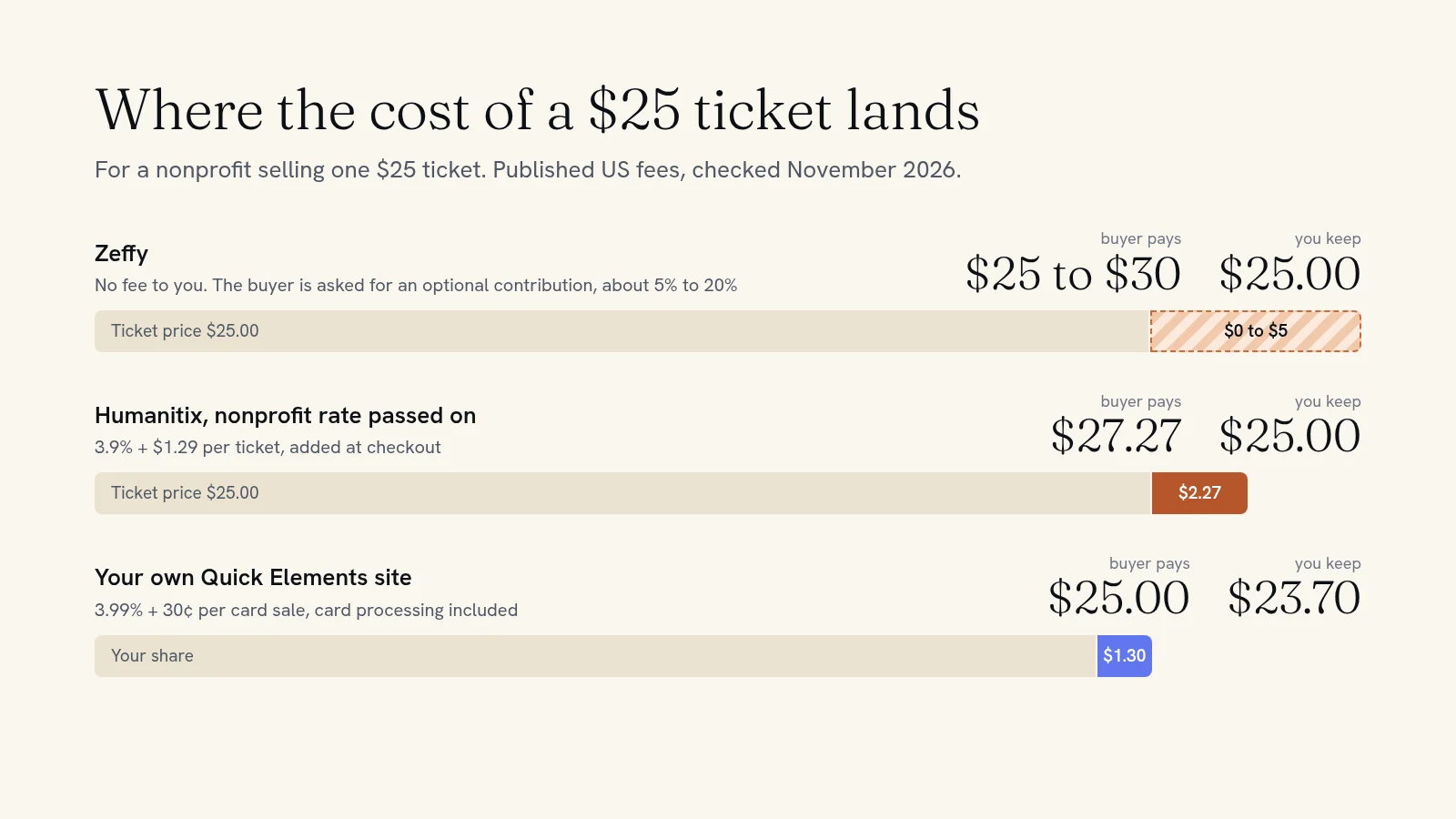
Zeffy publishes the range, not the exact suggestion for each amount. On a $25 ticket, 5% to 20% would be $1.25 to $5. So a buyer pays somewhere between $25 and about $30, depending on what they choose, and your organization gets $25 either way.
| Buyer pays | Your organization keeps | |
|---|---|---|
| Zeffy, buyer sets the contribution to $0 | $25.00 | $25.00 |
| Zeffy, buyer adds 5% | $26.25 | $25.00 |
| Zeffy, buyer adds 20% | $30.00 | $25.00 |
| Humanitix, nonprofit rate passed on | $27.27 | $25.00 |
| Your own Quick Elements site | $25.00 | $23.70 |
On every other option the cost lands on someone: you, or a fee the buyer sees added at checkout. Zeffy's cost lands on the buyers who choose to pay it. For a school play or a gala where the audience wants to support you, many will. The form starts from Zeffy's suggestion, though, and giving nothing takes a deliberate choice of "Other" and $0. Read your own form the way a buyer would before you share it.
Who can use Zeffy
Zeffy is for nonprofit organizations with a bank account in the organization's name. Personal bank accounts aren't allowed, even for a nonprofit.
- US: you need an EIN. You don't need 501(c)(3) status. A group running on a not-for-profit basis without an EIN can't use it.
- Canada: nonprofit status, but you don't need to be a registered charity.
- Also open in the UK, Ireland, Australia and Germany, each with its own registration rules.
- Not eligible: for-profit businesses, individuals raising money for themselves, and most other countries.
Zeffy lists schools, PTAs, sports teams, churches and arts groups among the organizations it serves. If you run a studio, a venue or an escape room and want to host a charity night, Zeffy isn't open to your business. Its rules allow a business only when it's raising money for a verified nonprofit, and then the money goes to the nonprofit, not to you.
Zeffy vs selling from your own website
If you're an eligible nonprofit and all you need is a way to sell tickets or take donations, nothing we offer costs your organization less than Zeffy. On a Quick Elements site you pay 3.99% + 30¢ per card sale, card processing included, which is $1.30 on a $25 ticket, plus a plan from $29 a month on a yearly plan.
Where your own site makes sense for a nonprofit:
- You want one website that does everything: your programs, a volunteer sign-up form, a newsletter, an email address on your own domain, and event pages on your own address, in your design.
- You want the price people see to be the whole price, with no extra question at checkout.
- You run events all year, like weekly classes or a monthly concert series, with repeating dates, ticket types and reminder emails.
Gifts can go through the shop on a Quick Elements site as set amounts, such as "$28 feeds a family for a week". The nonprofit template comes with program pages, gift items and volunteer shifts ready to fill in. If you're planning a single benefit night, our guide to selling tickets for a fundraiser walks through it from start to finish, and Humanitix's fees are worth a look if you want the fee to go to charity too.
Before you choose
Check your status first: if your organization has no EIN, or you're a business, Zeffy is off the table. If you qualify, build one Zeffy form and go through it as a buyer, contribution question and all. If you're happy with what your supporters will see, it's the cheapest way for your organization to sell. If you want your events on your own website, run your ticket price through the ticket fee calculator to see what that costs.