
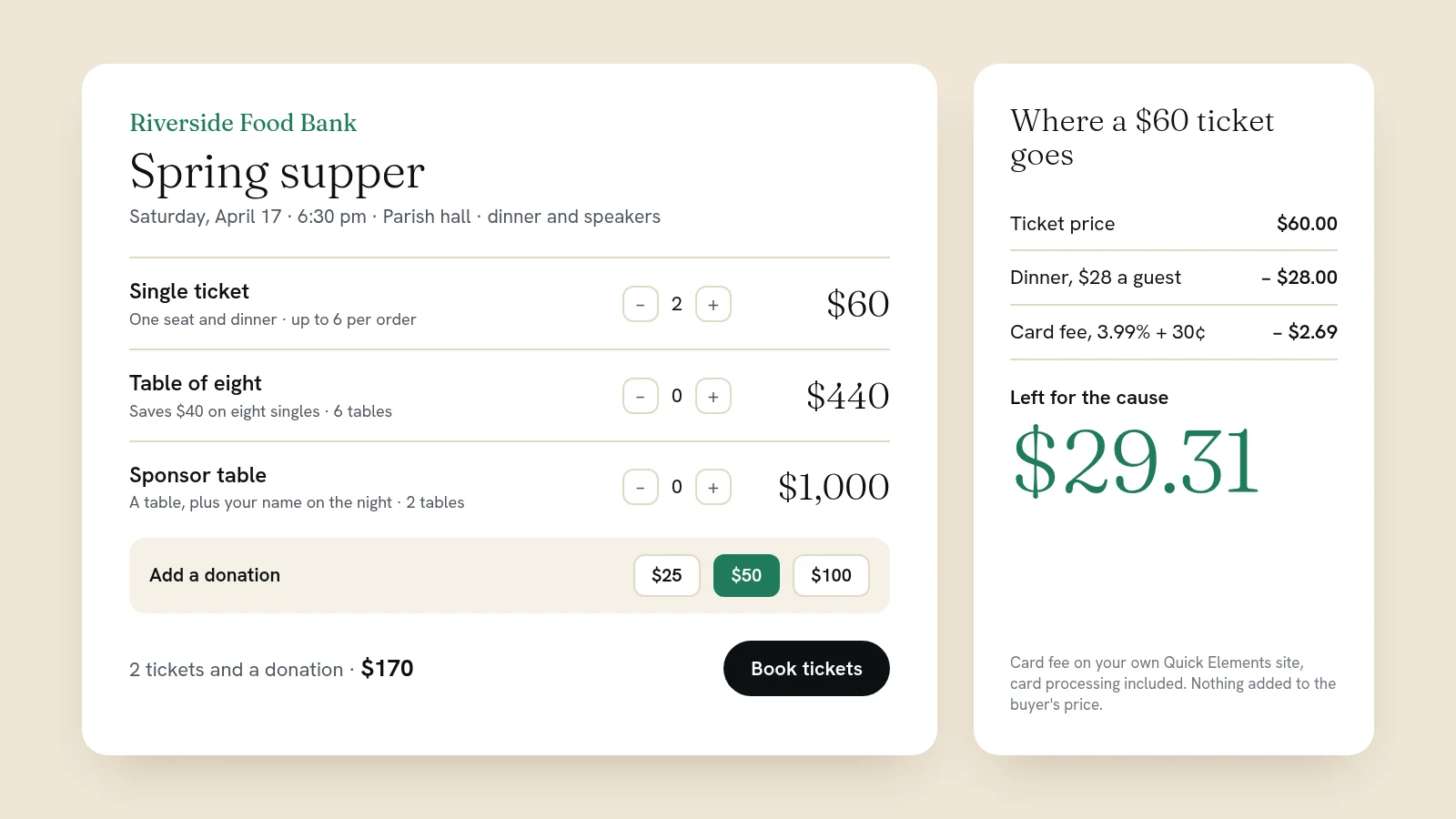
To sell tickets for a fundraiser online, put the event on one page that says what the money is for, what a ticket includes and how many are left. Sell two or three ticket types (a single ticket, a table and a sponsorship), and pick a way of selling that leaves as much of each ticket with the cause as possible. Then add a way for people to give on top, keep some seats back for the door, and agree the receipt wording with your treasurer before the first ticket sells.
Below is each step, worked through for a $60 dinner ticket. It's written for the volunteer who was handed this job at the last committee meeting.
Choose your ticket types
Most fundraisers need three or four ticket types. More than that and people stop to puzzle over which one is theirs.
| Ticket | Example price | Who buys it |
|---|---|---|
| Single ticket | $60 | Most guests. Make it a round number, because it's the price everyone talks about. |
| Table of eight | $440, saving $40 | A family, a group of friends or a local business. One buyer brings seven guests you didn't have to sell to. |
| Sponsor table | $1,000 | A business that wants to be thanked in public: its name on the screen, in the program and in the thank-you email. |
| Student or under-25 | $30 | Only if you want younger people in the room. |
Sell sponsor tables first, by asking people in person, before the event goes on sale to everyone. Volunteers, speakers and performers come free, so count their seats from the start and the room is never oversold.
Price it so the cause gets the money
Work out what each guest costs you, then see what's left of each ticket. Take a dinner where the caterer charges $28 a head and the hall is donated:
| Single, $60 | Table of eight, $440 | Sponsor table, $1,000 | |
|---|---|---|---|
| Dinner at $28 a guest | $28.00 | $224.00 | $224.00 |
| Card fee, 3.99% + 30¢ | $2.69 | $17.86 | $40.20 |
| Left for the cause | $29.31 | $198.14 | $735.80 |
Two sponsor tables raise more than five ordinary tables. That's why sponsors deserve your first phone calls. If a single ticket leaves less than half its price for the cause, either cut the cost of the evening or raise the price and say on the page where the money goes. Guests at a fundraiser rarely mind paying more when they can see why.
What fees do to a charity ticket
Every fee comes out of what you raise, so compare them before you choose how to sell. Here is what the cause keeps from the same two tickets, with each service's fees paid by you rather than added to the buyer's price:
| How you sell | Keeps from a $60 single | Keeps from a $440 table |
|---|---|---|
| Eventbrite, table sold as one ticket | $54.25 | $409.17 |
| Eventbrite, table sold as eight $55 tickets | $54.25 | $396.68 |
| Your own Quick Elements site | $57.31 | $422.14 |
| Zeffy | $60.00 | $440.00 |
- Eventbrite charges its $1.79 on every ticket, so sell a table as one ticket, not eight. Free events cost nothing there.
- Wix Events adds a 2.5% ticket service fee on top of card processing, and Wix says it can't waive it for nonprofits.
- Zeffy is free for nonprofits. It's paid for by an optional tip that buyers are invited to add for Zeffy at checkout. Our Zeffy fees guide explains how that works.
To be fair about it: if your group is a nonprofit and all you need is to sell tickets for one evening, Zeffy is hard to beat on fees. A website of your own earns its keep when the dinner is one event in a year of them, and you want the tickets, the donations, the volunteer sign-ups and the newsletter in one place, under your own name. Try your own prices in our ticket fee calculator.
Let people give more than the ticket
Some guests will happily give more. Make it one tap, at the moment they're already paying.
- Offer donation amounts at checkout, such as $25, $50 and $100, next to the tickets.
- Give people who can't come a way to give anyway: a donation on its own, at the same few amounts.
- Put the same donation link in the thank-you email after the event, with the total raised. The total raised is the best moment to ask again.
Raffles and auctions bring in money too, but the rules for them differ from state to state, including whether you may sell raffle tickets online at all. Check yours before you add one.
Receipts and the tax question
A fundraiser ticket is usually not a donation in full, because the guest gets dinner for it. In the US, when someone pays a charity more than $75 and gets something back, the charity has to give them a written statement saying that only the amount above the value of what they received may be deductible, with a good-faith estimate of that value. The IRS's own example is a $100 payment that includes a $40 concert ticket, of which $60 is a contribution (IRS guidance, checked November 2026).
This isn't tax advice, and not every group that holds a fundraiser is a charity. Ask your treasurer or accountant two things before you sell: whether your group can issue receipts at all, and what wording and value to put on them. Then put that wording in the email every buyer gets.
Selling at the door
Some people always turn up on the night. Plan for them:
- Keep seats back. In a room of 120, sell 110 online and hold 10 for the door.
- Bring a cash float and a way to take cards, and put one person in charge of the money.
- Record every door sale in the same place as the online ones, so the count is right and the treasurer's total matches the bank.
- Have a list of who's coming, sorted by name, for the welcome table. Our guide to checking guests in at the door covers that part.
Set it up on your own website
On a Quick Elements site, the fundraiser gets its own page on your web address, in your design, with the story of the cause above the tickets. You set it up once:
- Add each ticket type with its own price and number for sale: say 60 single seats, six tables and two sponsor tables.
- Set the most per order, so one buyer can't take all the singles.
- Add the donation amounts as extras that can only be bought with a ticket, and put a donation on its own in your shop for people who can't come. There's no box to type any amount, so pick three amounts that suit your crowd.
- Write the confirmation email yourself, with the receipt wording your treasurer gave you. Add a reminder two days before with parking and the dress code, and a thank-you the day after with the total raised.
- Enter door sales by hand as cash, card or check. They count against the same number of seats as the online ones.
Every sale lands in one list you can search by name and filter by event, which is your door list and your treasurer's report. You pay 3.99% + 30¢ per card sale with processing included, and nothing is added to the buyer's price.
A timeline that works
- Eight weeks before: ask sponsors and table hosts in person.
- Six weeks before: put the page live and email everyone on your list.
- Three weeks before: post photos from last year, with a link to the page.
- One week before: give the caterer final numbers.
- The day before: print the guest list in name order.
- The day after: send the thank-you with the total raised and a donation link.
Start with your cost per guest
Write down what each guest costs and what you want to raise, and you have your ticket prices. Check what fees would take from them in the ticket fee calculator. If you'd like tickets, donations and volunteer sign-ups on one site of your own, the nonprofit design comes with free volunteer shifts and donation items already in place. See plans.