
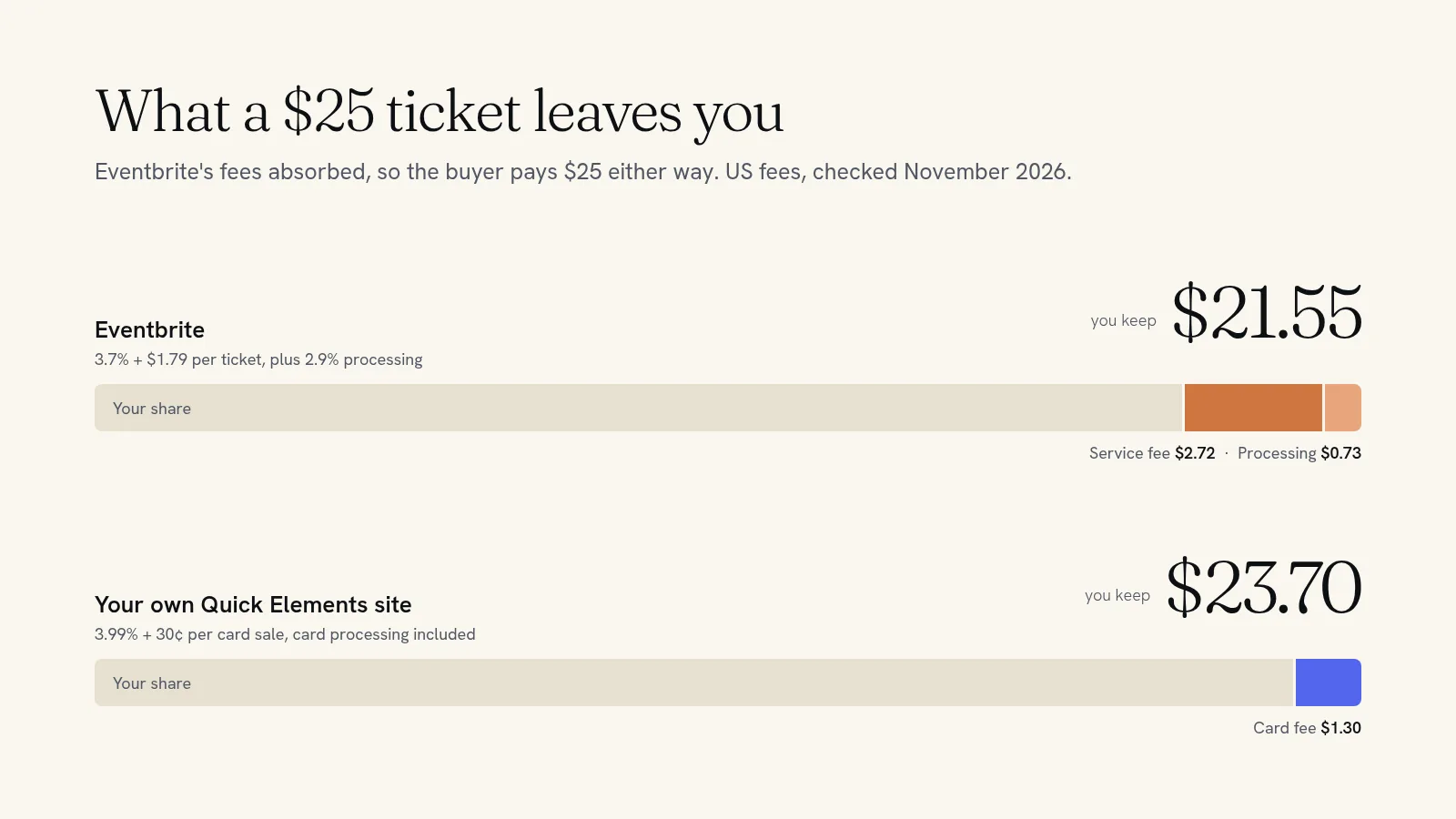
As of November 2026, Eventbrite charges US organizers a service fee of 3.7% + $1.79 on every paid ticket, plus a 2.9% payment processing fee on the whole order. Free events cost nothing. On a $25 ticket that comes to about $3.45 if you absorb the fees, or about $3.52 your buyer pays on top if you pass them on. The fixed $1.79 is the part that hurts most: on a $10 ticket, a quarter of the price goes to fees.
Below is every fee line, what it takes from tickets at four common prices, and the ways organizers keep more of each sale, including selling on their own website.
Eventbrite's fees in the US, line by line
Eventbrite calls the total a "Ticketing Fee". It is made of two parts, and both apply to every paid ticket and paid add-on.
- Service fee: 3.7% of the ticket price + $1.79 per ticket. Charged per ticket, so an order of four tickets pays the $1.79 four times.
- Payment processing fee: 2.9% of the total order. Eventbrite works this out on everything the buyer pays, including the service fee and any tax.
- Free tickets: no fees. You can publish as many free events as you like.
- Selling at the door with Eventbrite's organizer app: $1 per paid ticket, plus 2.9% on card sales. You can pass the $1 on, but not the processing fee.
- Optional subscriptions: Eventbrite Premium ($69 a month) and Ultimate ($199 a month) add marketing extras such as ad credits and more promotional emails. You don't need either to sell tickets.
Fees differ by country. In Canada the service fee is 3.5% + C$1.29 per ticket, plus 2.9% processing on the order. In the UK it is 6.95% + £0.59 per ticket and in Australia 5.35% + A$1.19, with no separate processing fee in either.
All figures come from Eventbrite's pricing page and its help article on ticketing fees, checked in November 2026.
What Eventbrite takes from a $10, $25, $50 and $100 ticket
By default your buyers pay the fees on top of your price. You can tick "Absorb fees" on a ticket type instead, and Eventbrite takes them out of your payout. Here is what each choice looks like for a US event, before any tax.
| Ticket price | Service fee | Processing (if you absorb) | You keep if you absorb | Buyer pays if you pass fees on |
|---|---|---|---|---|
| $10 | $2.16 | $0.29 | $7.55 | $12.51 |
| $25 | $2.72 | $0.73 | $21.55 | $28.52 |
| $50 | $3.64 | $1.45 | $44.91 | $55.20 |
| $100 | $5.49 | $2.90 | $91.61 | $108.55 |
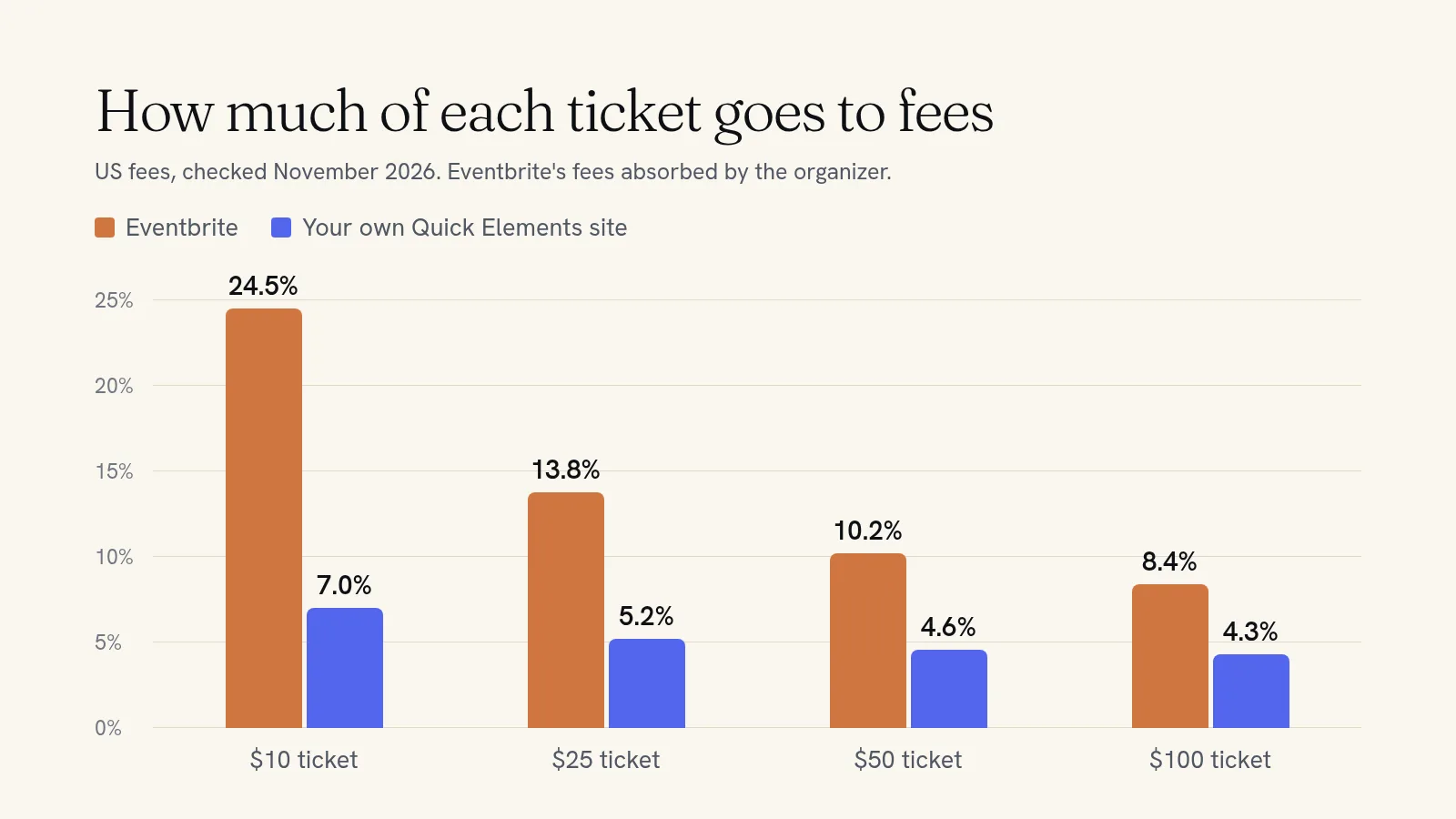
Look at the first row. A $10 workshop, quiz night or open mic loses $2.45, nearly 25% of the ticket, if you absorb the fees. At $100 the same fees are about 8%. Cheap tickets carry the heaviest load, because $1.79 is the same whatever the price.
Should you absorb the fees or pass them on?
Passing fees on protects your income, but your buyer sees one price on the event page and a higher one at checkout. A $25 ticket becomes $28.52 at the very last step, which is when people are most likely to change their mind.
Absorbing keeps the price honest and costs you 14% of every $25 ticket. Many organizers split the difference: they raise the ticket price by a dollar or two and absorb the rest, so the price people see is the price they pay.
There is no right answer, but there is a cheaper one, which is to pay less in fees to begin with.
How to keep more of each ticket
- Sell groups as one ticket. The $1.79 is charged per ticket. A "table for four" sold as a single $100 ticket pays it once instead of four times.
- Keep the cheap stuff off Eventbrite. If you run a $10 weekly night, the fixed fee eats the most there. Those are the events to move first.
- Take door sales in person. Through the organizer app it costs $1 per ticket plus 2.9% on cards, well under the online rate.
- Sell from your own website. Ticketing on your own site usually means one fee per card sale and no per-ticket service fee. On Quick Elements that fee is 3.99% + 30¢ per card sale, with card processing included, on every plan.
Eventbrite vs your own website, ticket by ticket
Here is the same comparison with what you keep on each sale. Eventbrite's column assumes you absorb its fees so both columns show the same price to the buyer.
| Ticket price | You keep on Eventbrite | You keep on your own Quick Elements site | Difference per ticket |
|---|---|---|---|
| $10 | $7.55 | $9.30 | $1.75 |
| $25 | $21.55 | $23.70 | $2.15 |
| $50 | $44.91 | $47.70 | $2.79 |
| $100 | $91.61 | $95.71 | $4.10 |
Your own site isn't free. Quick Elements plans start at $29 a month on a yearly plan, and that covers the website, the ticketing, a domain name, a business email account and email marketing. At $25 a ticket you save $2.15 each, so the plan pays for itself after about 14 tickets a month. At $10 a ticket it takes about 17. Everything after that is money you keep.
What Eventbrite gives you for its fee is its marketplace. People browse it to find things to do, and Eventbrite says it reaches 89 million people a month. If most of your buyers are strangers who found you there, that reach may be worth the cost. If most of them already follow you, read your newsletter or came last time, you are paying a marketplace fee on people you brought yourself.
What selling on your own site looks like
On a Quick Elements site, every event gets its own page on your web address, in your design, where visitors pick a date and buy. You set it up once:
- Ticket types such as Standing, Seated and VIP, each with its own price, number available per date, and limits per order.
- Repeating dates for weekly nights, with days off for holidays, so you don't recreate the event every week.
- Shared capacity, so two events in the same room can never sell more places than the room holds.
- Add-ons like a drink voucher or a T-shirt, which people can only buy with a ticket.
- Prices by date, for a cheaper preview night or a higher Saturday price.
- Confirmation and reminder emails you write yourself, sent automatically before the event.
- Door sales and phone bookings entered by hand, recorded as cash, card or check, and counted against the same capacity.
When only a few places are left, the event page says so, and a sold-out date can't be booked. Every sale lands in one list you can search and filter by event. If you want the step-by-step setup, our guide to selling event tickets on your own website walks through it, and the music venue template shows a finished line-up page with tickets.
Keep the $2 a ticket
If you sell more than a dozen or so tickets a month to people who already know you, Eventbrite is charging you for an audience you built. Put your events on your own site, keep your list, and pay 3.99% + 30¢ a sale instead of 3.7% + $1.79 plus processing. You can still list your biggest nights on Eventbrite for reach while your regulars buy from you directly.
See how the two compare feature by feature on our Eventbrite alternative page, or choose a plan and have your first event on sale today.