
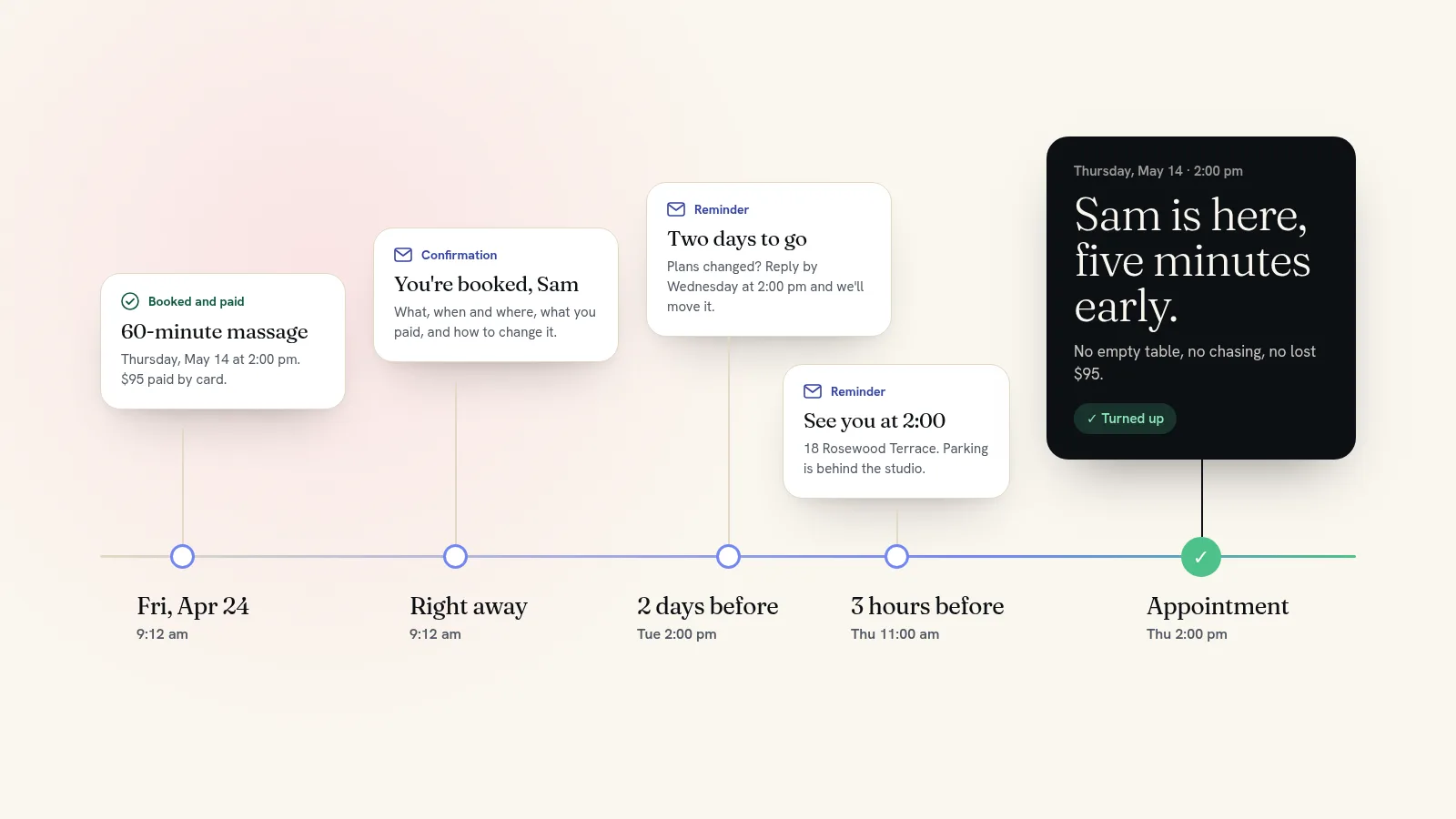
The two changes that cut no-shows most are taking payment when someone books and reminding them before the appointment. A client who has paid has a reason to turn up, and a client who has been reminded can't forget. Add a short cancellation policy, an easy way to move a booking, and a plan for filling empty spots, and no-shows go from a weekly cost to an occasional one.
Below are the fixes in the order they usually pay off, with reminder timings and wording you can use today.
Why people don't show up
Very few no-shows are people being rude. Most come down to one of five reasons, and each has its own fix.
| Why they missed it | What fixes it |
|---|---|
| They forgot. They booked three weeks ago and nothing reminded them. | Reminders at the right times |
| It cost them nothing, so something better won. | Payment or a deposit when they book |
| Cancelling meant a phone call during work hours, so they didn't. | One clear line on how to cancel, in every email |
| Nobody told them a missed slot costs you money. | A short policy, shown before they pay |
| Their plans changed. | Easy rescheduling and a quick way to refill the time |
1. Take payment when they book
This is the biggest single fix. When the booking is already paid for, a no-show costs the client rather than you, and most people turn up.
For classes, workshops and appointments under an hour or so, take the full price at booking. For long or expensive appointments, a deposit does most of the same work without feeling steep; our guide to taking deposits for appointments covers amounts and wording. Free consultations are the exception. Keep them free, keep them short, and remind people about them.
On Quick Elements every booking goes through your site's own checkout, so card payment at booking is how it works from day one, not an extra you set up. A free consultation uses the same booking page with a price of zero.
2. Send reminders at the right times
One reminder helps. Two well-timed ones help more: the first gives people time to tell you their plans have changed, while you can still fill the slot, and the second catches anyone who has simply forgotten. This schedule suits most appointment and class businesses:
| When | What it does |
|---|---|
| Straight after booking | Confirms what, when and where, what they paid, and how to change it. |
| 2 days before | Gives anyone whose plans changed time to tell you, while the slot can still be resold. |
| Morning of, or 2 to 3 hours before | Catches people who forgot. Include the address and where to park. |
| The day after | Says thank you and links to book again. |
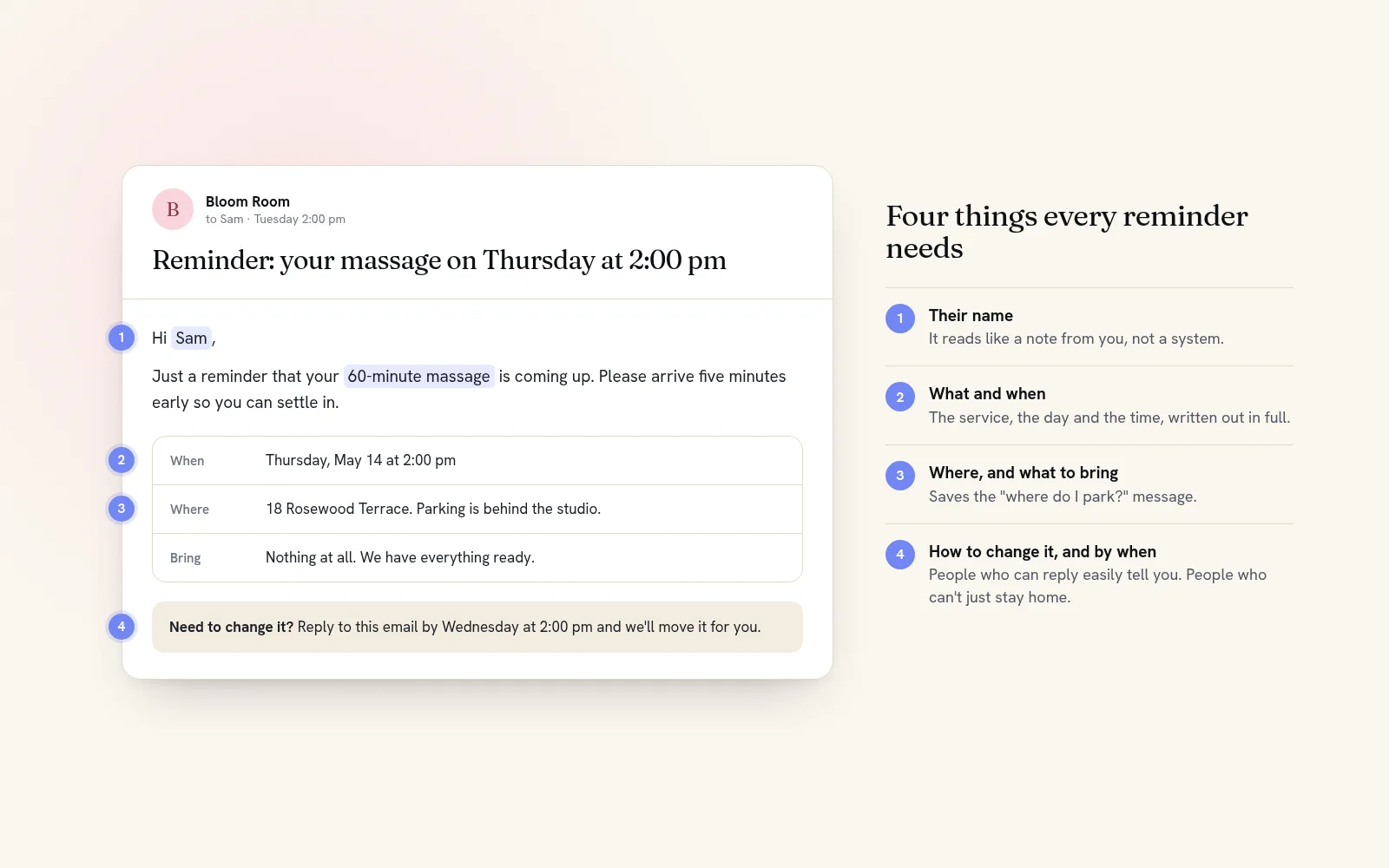
Keep each reminder short: their name, what they booked, the date and time, the address, anything to bring, and one line on how to move it. Here is one to adapt:
Hi Sam, just a reminder that your 60-minute massage is on Thursday, May 14 at 2:00 pm at 18 Rosewood Terrace. Please arrive five minutes early. If you need to change it, reply to this email by Wednesday at 2:00 pm and we'll move it for you.
Quick Elements sends these for you. Each service or class gets its own confirmation, as many reminders as you want set minutes, hours, days or weeks ahead, and follow-ups after it ends. You write the words and drop in the customer's name, the date, the time and the location, and each email goes out once per booking. Reminders go by email. If some clients only ever read texts, send a quick personal text the day before your longest appointments, which are the gaps that hurt most.
3. Make it easy to cancel or move
It sounds backwards, but making cancelling easier cuts no-shows. Someone who can't face a phone call will often just stay home. Someone who can reply to an email will tell you, and you get the time back to sell.
Put one plain line in every confirmation and reminder: how to cancel or move, and by when. When a request comes in, move the booking to another open time or cancel it from your list of who's booked. On Quick Elements either takes a couple of clicks, and the freed place goes straight back on sale on your booking page.
4. Show your policy before they pay
A policy sets expectations, and it doesn't need to be harsh. "Please give us 24 hours' notice. Later cancellations and missed appointments are charged 50%" is enough. People who read that before paying behave differently from people who find out afterwards.
Put it where they'll see it: a one-line note on the booking page, the confirmation email, and every reminder. Our guide to writing a cancellation policy has wording for salons, studios and classes.
5. Don't open the diary too far ahead
The further ahead someone books, the more likely they are to forget or to make other plans. Unless your clients really do plan months out, open appointments four to six weeks ahead and let the window roll forward. On Quick Elements this is a single setting that controls how many upcoming dates and times people can book.
6. Fill the gaps fast
Some people will still cancel late. What matters then is how quickly the time finds someone else.
- Keep a short list of regulars who'd take a last-minute opening, and email them when one comes up. A tag on their contact record is all it takes.
- Post same-day openings wherever your clients already follow you, with a link straight to the booking page.
- Put the freed time back on sale at once, so someone browsing your site tonight can take it.
Quick Elements doesn't run an automatic waitlist, but cancelled places go back on your booking page by themselves, and you can tag contacts and email a group of them from the same dashboard.
7. Follow up after a no-show
Send a short, friendly message the same day. Most people are embarrassed and will rebook if you make it easy. Apply your policy the same way every time, and keep a note of who misses. A fair rule: after two no-shows, that client pays in full when they book.
If you took payment upfront, there is nothing to chase. If you decide to give some back, Quick Elements lets you refund a whole booking or part of it from the order, so you can keep a late fee and return the rest.
Cut no-shows with Quick Elements
The fixes that matter most are built into every Quick Elements website: bookings paid by card when they're made, confirmations and reminders that send themselves, refunds in full or in part, and cancelled places that go straight back on sale. Phone bookings go into the same diary, so your list of who's coming is always the real one.
Pick a design made for your trade, such as the salon design, and your booking page is ready for your own times and prices the day your site goes live. See plans and pricing.