
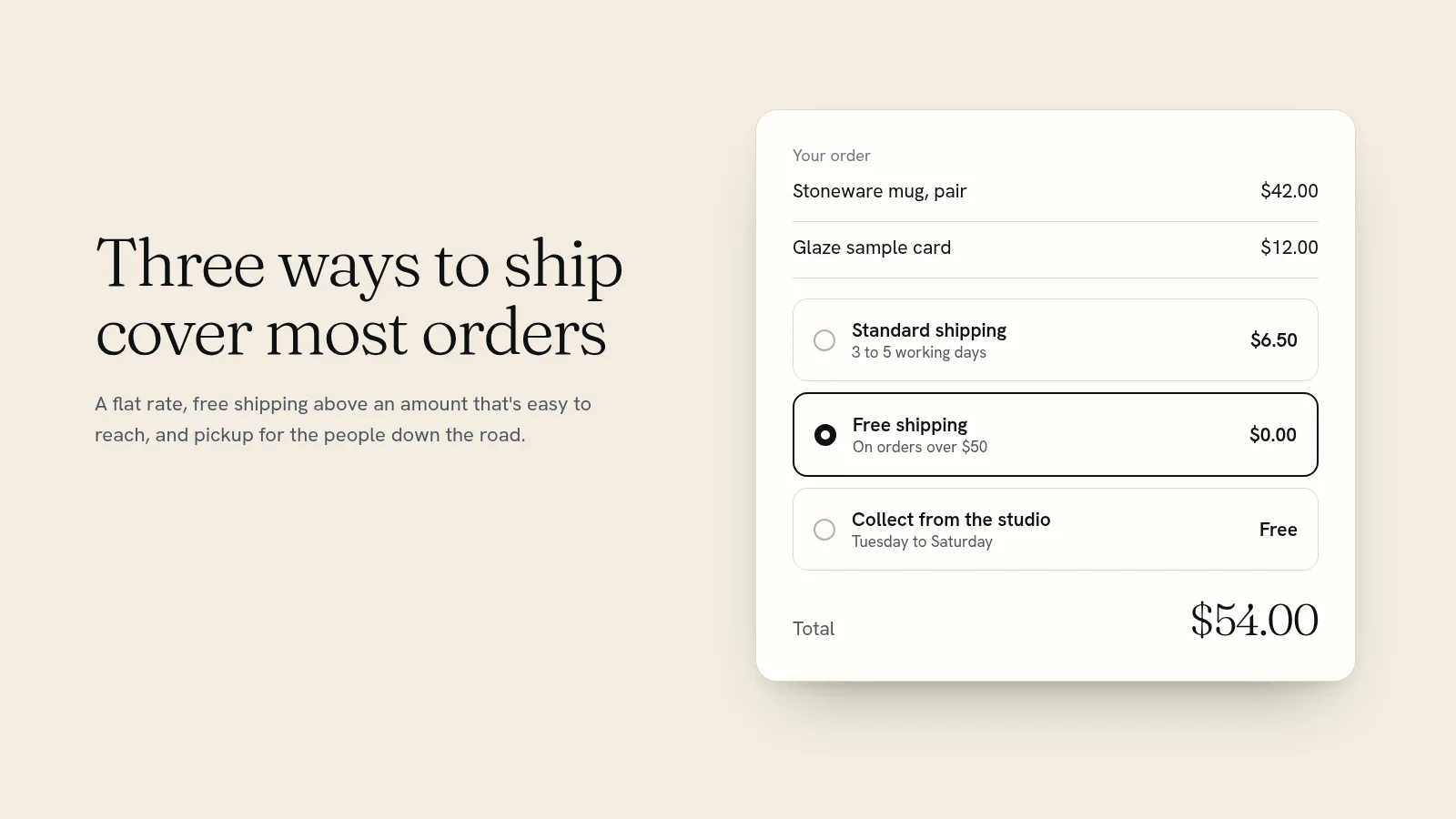
Most small online stores do best with a simple setup: one flat shipping rate per order, worked out from what your typical parcel really costs to send, free shipping once an order passes an amount a little above your average basket, and free local pickup for people nearby. Add a separate rate for heavy items and for other countries, and you have covered nearly every order without making customers do maths at checkout.
This guide shows how to work out your real cost per parcel, the five ways to charge for shipping and when each one fits, how to pick a free shipping threshold, and how to set it all up in your store.
Start with what one parcel really costs you
Shipping rates go wrong when they're based on postage alone. Add up everything a typical order costs to send:
- Postage for your most common parcel size and weight. Use your carrier's own price calculator, not a guess, and check a few destinations: near, far, and the most expensive one you'll accept.
- Packaging: the box or mailer, tape, tissue, a thank-you card, a sticker.
- Extras you add as standard, such as tracking, insurance or signature on delivery.
- The card fee on the shipping charge. Shipping is part of what the customer pays, so the per-sale fee applies to it as well.
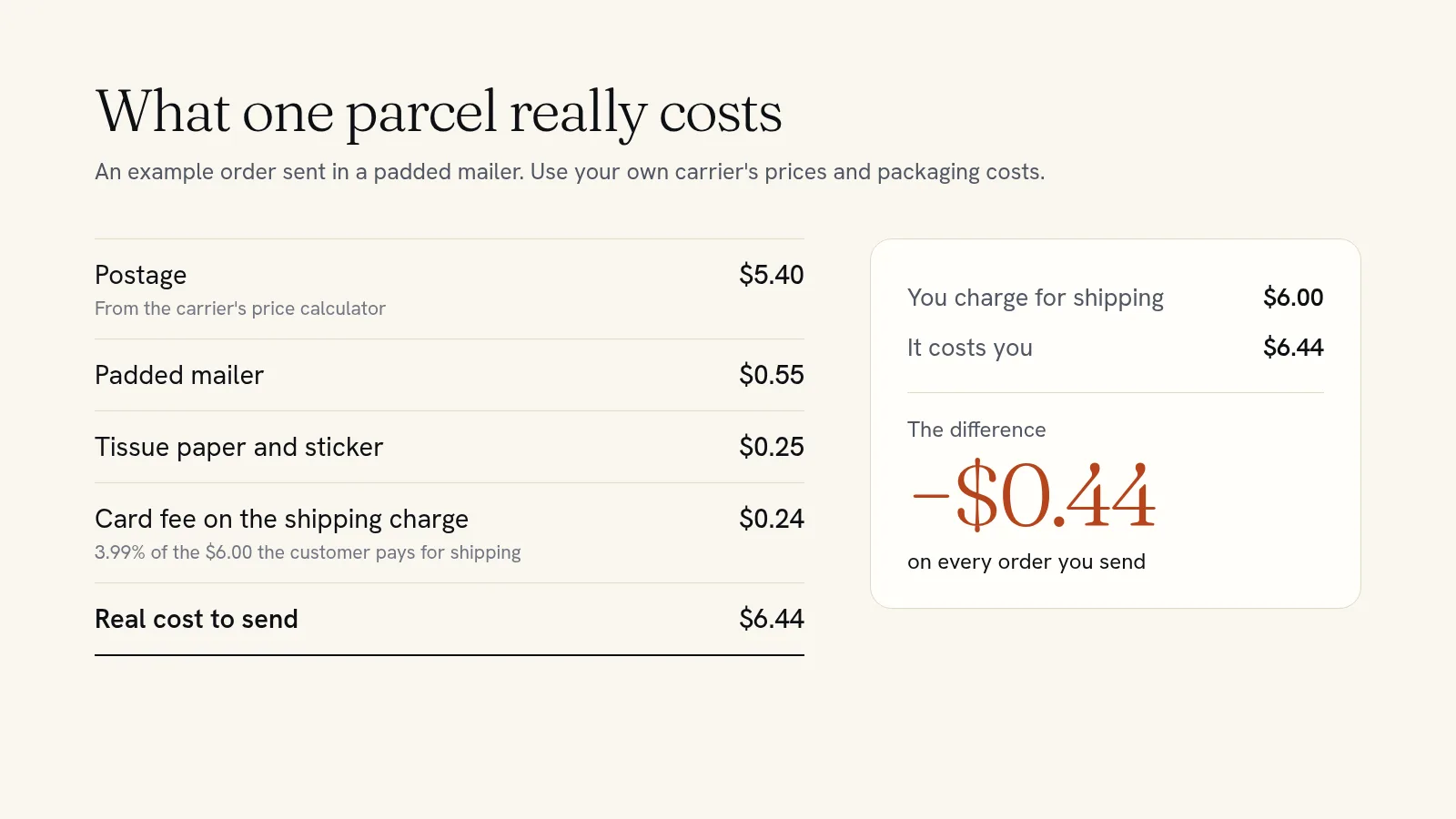
In that example, a $6 flat rate looks right and quietly loses 44 cents on every order. Small, until it's 300 orders a month. Round your rate up to cover the true cost, or decide on purpose to absorb some of it as a selling point.
Five ways to charge for shipping
| Method | How it works | Best for | Watch out for |
|---|---|---|---|
| Flat rate per order | One price, whatever is in the cart | Most small shops with similar-sized items | Big orders can cost more to send than you charge |
| Flat rate plus a charge per item | $5 for the first item, $1.50 for each extra one | Heavier items that add real postage | Customers may split orders if the extra charge is high |
| Free shipping over an amount | Free once the order passes a set value | Encouraging one more item in the cart | Setting the line so low you pay to ship small orders |
| Free shipping on everything | Postage built into your prices | Light items with good margins | Your prices look higher than shops that charge shipping |
| Rates by weight or by carrier | The checkout works out postage per parcel | Stores with very different sizes and weights | Needs every product weighed, and the totals change a lot |
For most small stores, three settings cover it: a flat rate, free shipping above a threshold, and local pickup. Only reach for weight-based rates if your products range from a postcard to a cast iron pan.
How to choose your free shipping threshold
Free shipping works best as a goal the customer can reach by adding one more thing. To set yours:
- Find your average order value from your store's sales reports: total sales divided by number of orders.
- Set the threshold a little above it, so a typical customer is one small item away. If your average order is $38 and your cheapest add-on is $12, free shipping over $50 is a nudge, not a stretch.
- Check that the margin on a $50 order covers the shipping you're now paying for.
- Say it everywhere: in a banner at the top of the site, on product pages and in the cart.
You can also make free shipping a reward instead of a rule. A coupon code that gives free shipping to your mailing list, for a launch weekend or on a first order has the same pull without giving up shipping income on every sale.
Local, national and international
Most stores need three groups of places, each with its own rates. Stores call these zones.
- Local. Free pickup from your shop or studio, and, if you deliver yourself, a delivery charge for the postcodes you can reach.
- Your own country. Your flat rate and free shipping threshold.
- Everywhere else. A higher flat rate for the countries you're willing to ship to, or nothing at all. It's fine not to ship abroad until you know what it costs. If you do, tell customers that import duty or tax may be due when the parcel arrives.
A store checks a customer's address against your zones in order and uses the first one that matches, so put the most specific zone, such as your local postcodes, at the top.
Heavy, bulky or fragile items
One flat rate breaks down when a few products cost far more to send: a large framed print, a set of ceramic plates, a bag of compost. Instead of raising the rate for everyone, group those products under their own shipping class, such as "Large items", and add a charge for that class on top of your normal rate. Everyone else keeps the simple price.
Show shipping costs before checkout
Unexpected costs are one of the main reasons shoppers leave a checkout. In the Baymard Institute's research on abandoned checkouts, 40% of US shoppers who left said extra costs such as shipping, tax and fees were too high, more than any reason except "just browsing". Slow delivery was another 20%.
You can't make postage free, but you can stop it being a surprise:
- Put your rates and the free shipping threshold on a short shipping page, and link to it from every product page.
- Give delivery times as a range of working days, from when the order is placed.
- Make pickup obvious for local customers, so they don't pay to post something they could collect.
Setting up shipping on Quick Elements
On a Quick Elements store, shipping lives in your store settings, and everything in this guide is built in:
- Zones by country, state or postcode, including a zone for everywhere you haven't listed.
- Flat rates per order, or a cost that grows with the number of items in the cart.
- Free shipping always, over an order amount you choose, with a coupon code, or either.
- Local pickup, free or with a charge.
- Shipping classes for heavy or awkward products.
You don't have to find the settings yourself. Tell the site's AI assistant something like "charge $6.50 shipping in the US, free over $50, let local customers collect for free, and don't ship abroad", and it sets up the zones and rates. Because customers would see the change, it shows you exactly what it will do and waits for your yes first.
If you sell printed-to-order products, the print partner's own shipping comes out of each sale and the customer pays whatever your store charges, so set your rates to cover it. Our guide to starting a print on demand store shows real numbers. And if you take pre-orders for collection, see how to take pre-orders online.
Get shipping right once, then forget it
Shipping is one of the few settings that touches every single order. An hour spent weighing parcels and pricing packaging stops you losing money on each sale and stops customers leaving at the last step. Quick Elements gives you flat rates, free shipping thresholds, pickup and zones in the same store as your products, payments and mailing list.
Choose a plan and set up your store, or browse the designs first to find one that fits what you sell.