
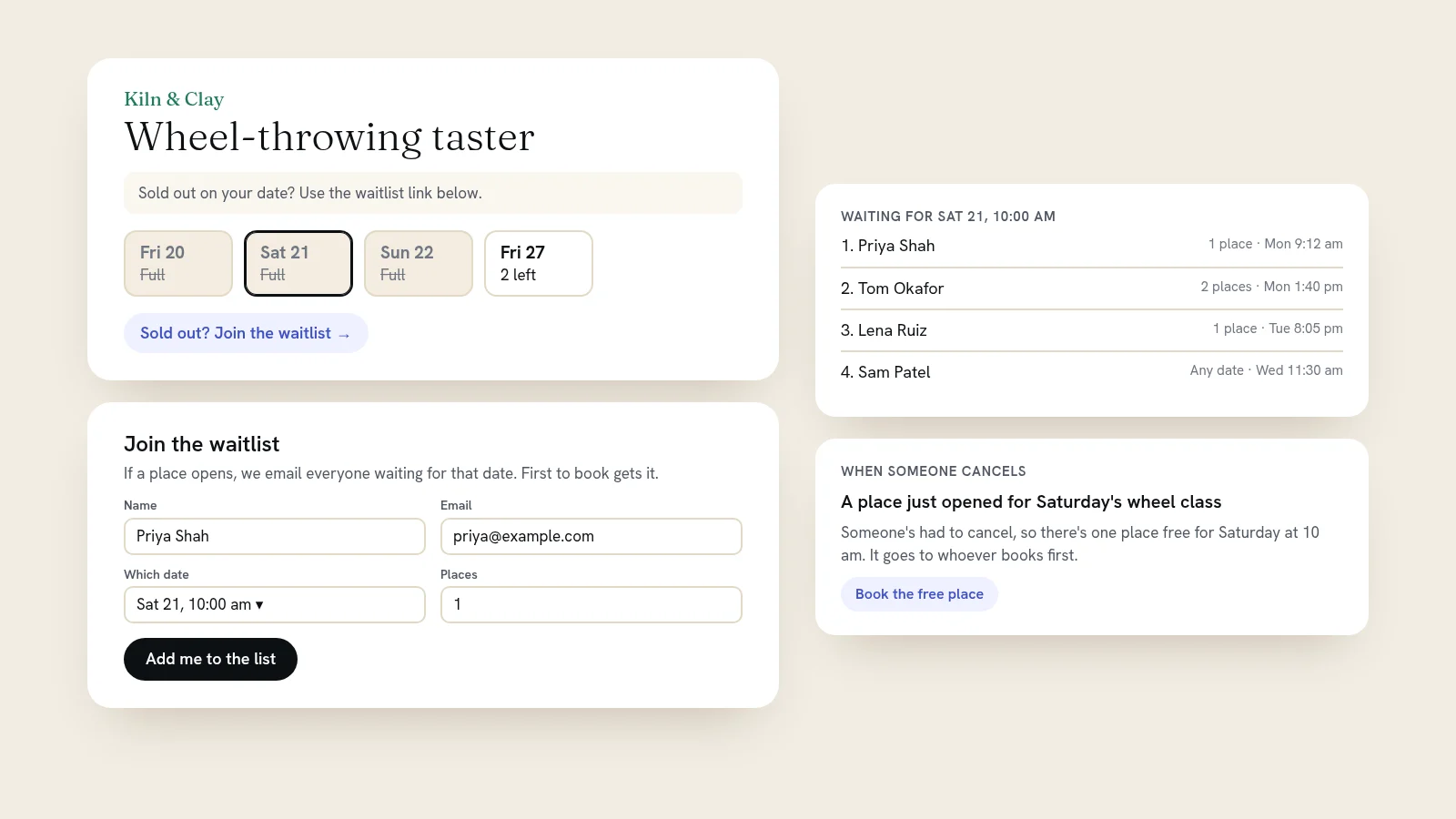
To run a waitlist for a sold-out class, put a short "tell me if a place opens" form on the class page, keep everyone's details in the order they signed up, and the moment a place frees up, email the people waiting for that date with a direct link to book. When the list grows to half a class or more, add another date and offer it to the list before anyone else. You don't need special software for this. A form, a list and a ready-written email will do.
Why a waitlist is worth it
A sold-out sign turns people away with nowhere to go. A waitlist keeps them, and it does three jobs:
- It fills the places that open up when people cancel, so a late cancellation doesn't leave an empty seat.
- It tells you when to add a date, with a list of people ready to book it.
- It builds a list of people who already want what you sell.
What the waitlist form should ask
Keep it short. Five questions are enough:
- Name
- Phone, if you'll text when a place opens close to the date
- Which date they want, with an "any date" option
- How many places they need
Add a line saying what happens next: "If a place opens, we'll email everyone waiting for that date with a link. The first to book gets it." Send each person an automatic reply so they know they're on the list.
Put the form where people hit the wall: a "Sold out? Join the waitlist" link at the top of the class description, and a line in the note above the dates telling people where to find it. If you run many classes, one waitlist page linked from each of them is easier to manage than a form per class.
When a place opens
There are two fair ways to offer it. Pick one and say which on the form.
First to book
Put the place back on sale and email everyone waiting for that date at once, with a link straight to it. Whoever books first gets it. It's fair, it's fast, and you don't have to chase anyone. It's the best choice when places open a few days before the class.
Subject: A place just opened for Saturday's wheel class. Hi Priya, someone's had to cancel, so there's one place free for Saturday at 10 am. It goes to whoever books first: [link]. If it's gone when you click, you're still on the list for the next one.
In order
Offer the place to the first person on the list, with a deadline: 24 hours if the class is a week away, a couple of hours if it's tomorrow. If they don't answer, move to the next. It rewards whoever signed up first, but it takes more of your time, and late places can go unfilled while you wait for replies.
Subject: Your place on Saturday's wheel class. Hi Priya, a place has opened for Saturday at 10 am and you're first on the list. Book here by 6 pm tomorrow to take it: [link]. After that, we'll offer it to the next person.
When to add a date
If the waitlist for a class reaches half the number of places, open another date and email the list before you announce it anywhere else. Give them a day or two of first pick. Eight people waiting for a ten-place class is a strong start on a new date, though not everyone will be free on the new day.
If one time keeps selling out while others don't, that's the time to repeat.
Keep the list tidy
- When someone books, take them off the list for that date.
- After each date passes, email anyone still waiting with the next dates, then clear them from that date's list.
- Don't send waitlist people your general newsletter unless they agreed to it. They signed up for one thing.
- If someone has been offered places three times and never booked, ask whether they'd still like to hear from you.
Cut cancellations in the first place
A waitlist works best alongside a clear cancellation policy. Let people give their place to a friend instead of cancelling, ask for notice so places can be offered in time, and send a reminder a few days ahead so cancellations happen early, not on the morning. Our guide to reducing no-shows covers the reminder emails that do this, and writing a cancellation policy has wording for classes.
Waitlists on Quick Elements
Quick Elements doesn't have a built-in, automatic waitlist. When a class is full for a date, the page stops selling it, and the waitlist is the method above: a form, the list it builds, and your email.
The form is quick to make on your site, with a dropdown of dates and a number of places. Every answer is emailed to you and saved on your site, and you can download the whole list as a spreadsheet. The form can also send each person an automatic reply confirming they're on the list. Put its link in the class description, and a line in the note above the dates telling people where to find it.
When someone cancels, open the class's list of who's booked for that date and cancel their booking, and the place goes back on sale straight away. Then send your "a place just opened" email with the link to that date. If you're offering in order instead, wait until the first person says yes before you cancel the old booking, then send them the link at once, so there's only a short moment when anyone else could spot the free place. If the person who can't come would rather move than cancel, you can move their booking to another date with space from the same list.
Write your two emails now, a "place opened" and a "new date", so they're ready the next time a class fills. Then see how studios run their classes on Quick Elements.