
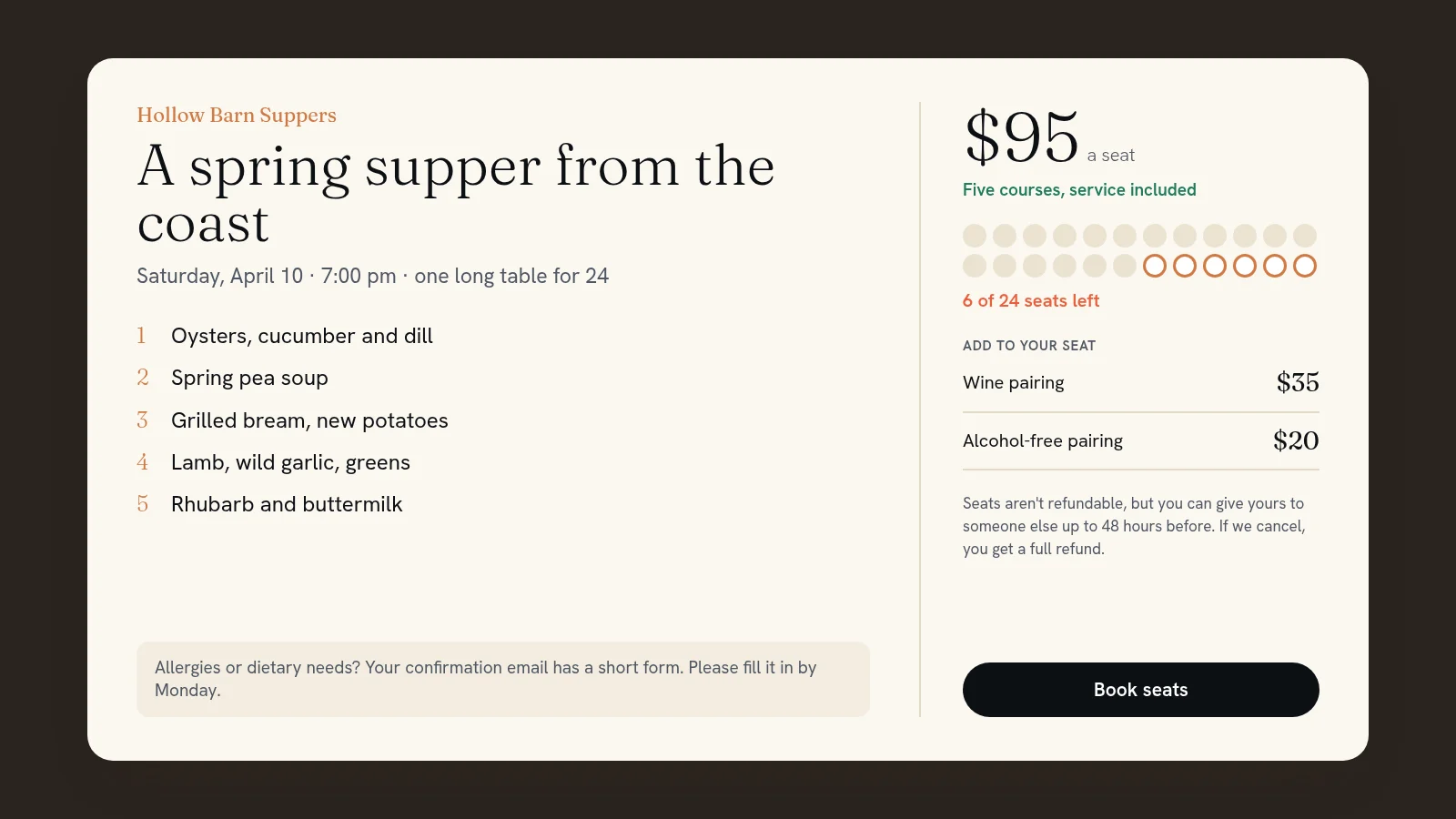
To sell tickets for a pop-up dinner, sell seats on a booking page with one all-in price that covers the food, the service and any fees, and take full payment when people book. Cap the seats at what your kitchen and room can serve well, offer drink pairings as an optional extra, and collect dietary needs straight after booking with a deadline a few days before the night. Make tickets non-refundable but transferable, and say what happens if you have to cancel. Then tell your mailing list before anyone else.
Decide how you sell the seats
How people sit decides what you sell:
- One long shared table: sell single seats. Simplest, and it suits a dinner where meeting strangers is part of the night.
- Separate tables: sell tables for two and tables for four as their own tickets, each with its own count, so a couple can't take a table set for four. Make sure the counts add up to the room.
- A mix: a few tables for two plus single seats at a shared table, for guests who come alone.
Set a limit per order, such as six, so one person can't buy half the room for a group you then can't seat together.
Price it all in
Show one price that covers everything guests must pay: the menu, the service and any booking fee. A $95 dinner that turns into $118 at checkout feels like a trick, even if every line is explained. Put optional extras, like a wine pairing, alongside the ticket rather than inside it.
Work the price out from your costs. Say you run a five-course dinner for 24 in a borrowed space:
| Five-course dinner at $95 a seat | 18 seats sold | 24 seats sold |
|---|---|---|
| Money in | $1,710.00 | $2,280.00 |
| Venue for the evening | $400.00 | $400.00 |
| Two servers and a dishwasher | $540.00 | $540.00 |
| Food, $28 a guest | $504.00 | $672.00 |
| Card fees, two seats per order | $70.92 | $94.56 |
| Left over | $195.08 | $573.44 |
This dinner covers its costs at 15 seats. If yours can't cover them at about two-thirds full, raise the price, cut a course or find a cheaper room before you announce it. For the full method, see how to price event tickets.
Service included, or not?
Pick one and say it plainly on the page. "Service included" is the easiest for a ticketed dinner: guests have paid, nobody fumbles with a tip at the end, and you pay your staff from the ticket price. If you'd rather leave tips to guests, say "service not included" so nobody is surprised.
In the US, a set charge built into the price is not treated as a tip. The IRS says a payment normally counts as a tip only when the customer chooses freely whether to pay it and how much, and decides who gets it (IRS guidance on tip income, checked November 2026). How you pass that money on to staff affects their pay and your taxes, so ask your accountant. This is general information, not tax advice.
Full payment or a deposit?
Take full payment for seats. A pop-up has one night to sell, food is bought for an exact number, and a no-show seat can't be resold at the door. A deposit makes sense only for private bookings, such as a company buying out the whole dinner, where a 25% to 50% deposit holds the date and the rest is due a week or two before. Our guide to taking deposits covers the wording.
Collect dietary needs early
Ask every guest, straight after booking, with a deadline: "Tell us about allergies and dietary needs by Monday." After that you've ordered the food. A short form works best:
- Each guest's name, since one person often books for a group.
- Checkboxes for the allergens you plan around. The US FDA names nine major food allergens: milk, eggs, fish, crustacean shellfish, tree nuts, peanuts, wheat, soybeans and sesame.
- Diets such as vegetarian, vegan or no pork.
- A box for anything else.
Say on the ticket page what you can't do. If your kitchen can't guarantee a dish free of nuts, or the menu can't be made vegan, tell people before they pay, not after.
Cancellations and transfers
For a one-night dinner, a fair policy is short:
Tickets aren't refundable, but you can give your seat to someone else. Just tell us their name and any dietary needs by 48 hours before the dinner. If we have to cancel, you'll get a full refund or a seat at our next dinner, whichever you prefer.
Put the one-line version on the ticket page and the full version in the confirmation email. For more on choosing the numbers, see how to write a cancellation policy.
Drinks and the rules
Selling or serving alcohol usually needs a license, and whether guests may bring their own depends on your state, county or city, and sometimes on the venue's own license. A borrowed restaurant may be able to serve under its own license; a gallery or a barn may have no license at all. Check with your local alcohol licensing office before you advertise drinks. If you can serve, a wine pairing sold as an extra, say $35 a guest, alongside a $20 alcohol-free pairing, adds money without raising the headline price.
Selling the seats
- Open sales to your mailing list a day or two before anyone else. Past guests already know your food.
- Announce the menu, the place and the date together. "Five courses from the coast, in a barn, on April 10" sells; "pop-up coming soon" doesn't.
- Post a photo of a dish or the table set for dinner, with a direct link to book.
- When seats are nearly gone, say how many are left, and keep a waitlist for the night it sells out.
Selling pop-up dinner tickets on Quick Elements
On Quick Elements, each dinner is an event with its own page on your web address. Sell seats as a ticket type with the number available, or tables for two and four as separate ticket types with their own counts, and set a limit per order. Wine and alcohol-free pairings go on as extras that can only be bought with a seat. Write a line like "Five courses, service included" in the note above the dates, and the page shows when only a few seats are left and stops selling when the room is full.
Booking doesn't ask guests extra questions, so collect dietary needs with a form instead: put its link in the confirmation email, and again in a reminder email timed five days before the dinner. Answers are saved on your site and you can download them as a spreadsheet for the kitchen. A reminder the day before can carry the address and arrival time. On the night, the booking list for that date is your door list, and walk-ins can be added by hand as cash or card sales so the seat count stays right. Card sales cost 3.99% + 30¢ each with processing included, and nothing is added to your guest's total, so $95 on the page is $95 at checkout.
Fill in the cost table with your own numbers today, and write the dietary form before you announce the date. If you're planning a regular series rather than a one-off, read how to start a supper club.