
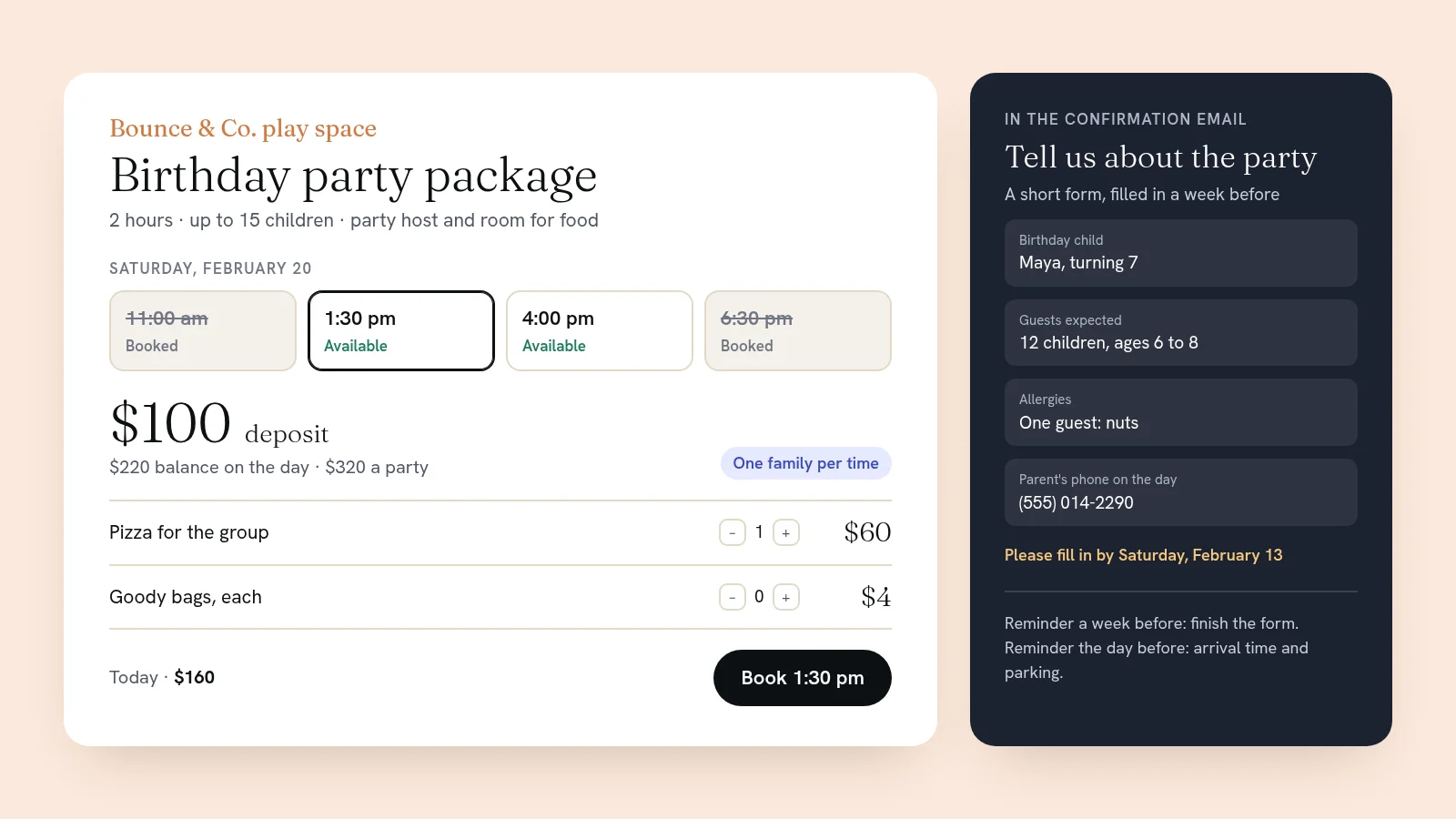
To take birthday party bookings online, turn each party package into something people can book at set start times, and make each time private so it closes to everyone else once a family books it. Take a deposit or full payment when they book, so the date is really theirs. Then collect what you need to know (the birthday child's name and age, allergies, how many guests) on a short form linked from the confirmation email. Parents book at 10 pm on their phones, so the whole thing should work without a phone call.
Build two or three packages
Parents want to compare a few clear options, not design a party from scratch. Give them two or three packages with everything that matters written down:
| Business | Example package | Example price |
|---|---|---|
| Play space | 2 hours, up to 15 children, party host, room for food | $320 a party |
| Arcade | 2 hours in the party room, free play on every machine, up to 14 people | $180 a party, extra hour $70 |
| Craft or pottery studio | 90 minutes, each child makes a piece to take home | $28 a child, 6 to 12 children |
| Escape room | A private game for the group, plus time in the lounge | $28 a player, 4 to 8 players |
Then add extras that can be bought with a party, not on their own: pizza for the group, goody bags, an extra half hour, a printed group photo. Extras are where a $320 party becomes a $400 one, and parents like choosing them.
Price per party or per child
A price per party suits a fixed room with a cap: the play space costs you the same whether 9 or 15 children come. Say what happens above the cap, such as $15 for each extra child.
A price per child suits anything where each guest uses materials, like clay, paint or game time. Set a minimum per booking so nobody books a private party for two, and a maximum that matches your room. In the studio example, a booking needs at least 6 children and no more than 12.
Set the times and keep each party private
Choose start times that leave time to clean and reset between parties: 11:00, 1:30 and 4:00 on a Saturday, for example, for two-hour parties with 30 minutes in between. Then make sure a booked time can't be sold twice:
- One room, one party at a time. Once a family books 1:30, that time closes to everyone else.
- Shared spaces. If the party uses the same room as your weekend classes, booking the party should close the class at that time, and the other way round.
- Cleanup time. Block 30 minutes after each party so nobody books a time that overlaps the cleanup.
- Two party rooms. Sell two parties per start time, so the third family sees that time as full.
Our guide to preventing double bookings goes into each of these.
Take a deposit or full payment
A party booked without payment is a Saturday slot held on a maybe. Take money when they book:
- A deposit for bigger packages: $100 to hold the date, with the balance paid on the day. Make the bookable price the deposit and label it clearly, such as "$100 deposit, $220 balance on the day".
- Full payment for smaller ones, where chasing a balance isn't worth the trouble.
Write the rules next to the price: whether the deposit is refundable, how much notice moves a party to another date, and when final numbers are due. Our guide to taking deposits has wording you can copy.
Collect the details you need
Booking takes the parent's name, email and phone. You need more than that before the day:
- The birthday child's name and the age they're turning.
- How many guests to expect, and their ages.
- Allergies and dietary needs.
- Food and extras, if they're choosing later.
- Anything the host should know: a theme, a guest who needs extra help, whether photos may be shared.
Put these on a short form, and put the form's link in the confirmation email with a deadline ("please fill this in a week before the party"). The answers are kept on your site, so the host has them on the day. A form after booking works better than a long form during it: the parent secures the date first and answers the questions when they've had a chance to ask the birthday child.
Reminders, and the day itself
- Straight after booking: a confirmation with the date, time, what's included, what's still to pay and the form link.
- A week before: a reminder to fill in the form and confirm numbers.
- The day before: arrival time, parking, and what to bring (cake, candles, a lighter).
- The day after: a thank-you, a link to leave a review, and a line about booking next year.
Party guests are your next party bookings. Put a small card in each goody bag with the web address of your party page, so the parents who pick up their children know where to book their own.
Write a party page that sells
Answer the questions parents would otherwise call about:
- What's included, and what isn't.
- How the two hours run: arrive and play, food, cake, goodbye.
- The most guests, and what an extra child costs.
- Whether they can bring their own food and cake.
- Whether parents stay, and where they wait.
- Photos from real parties, with permission.
Set it up on Quick Elements
On a Quick Elements site each package is a bookable session with its own page. You choose the days and start times, the price per party or per child, the fewest and most per booking, and extras like pizza or an extra hour. Turn on double-booking protection and a booked time closes to everyone else; add buffer minutes for cleanup, or link the party to the classes that use the same room. You write the confirmation and reminder emails, with the form link in them, and every party appears in one list by date, where you can move a party to another date if plans change. Card payments cost 3.99% + 30¢ each, card processing included.
The arcade bar design comes with a bookable party room already set up: $180 for two hours for up to 14 people, with an extra hour at $70.
Open your party calendar
Write down your two or three packages, your Saturday start times and your deposit rule. That's everything a party page needs. See how play cafes and party venues use it, or pick a plan and open bookings for next month.