
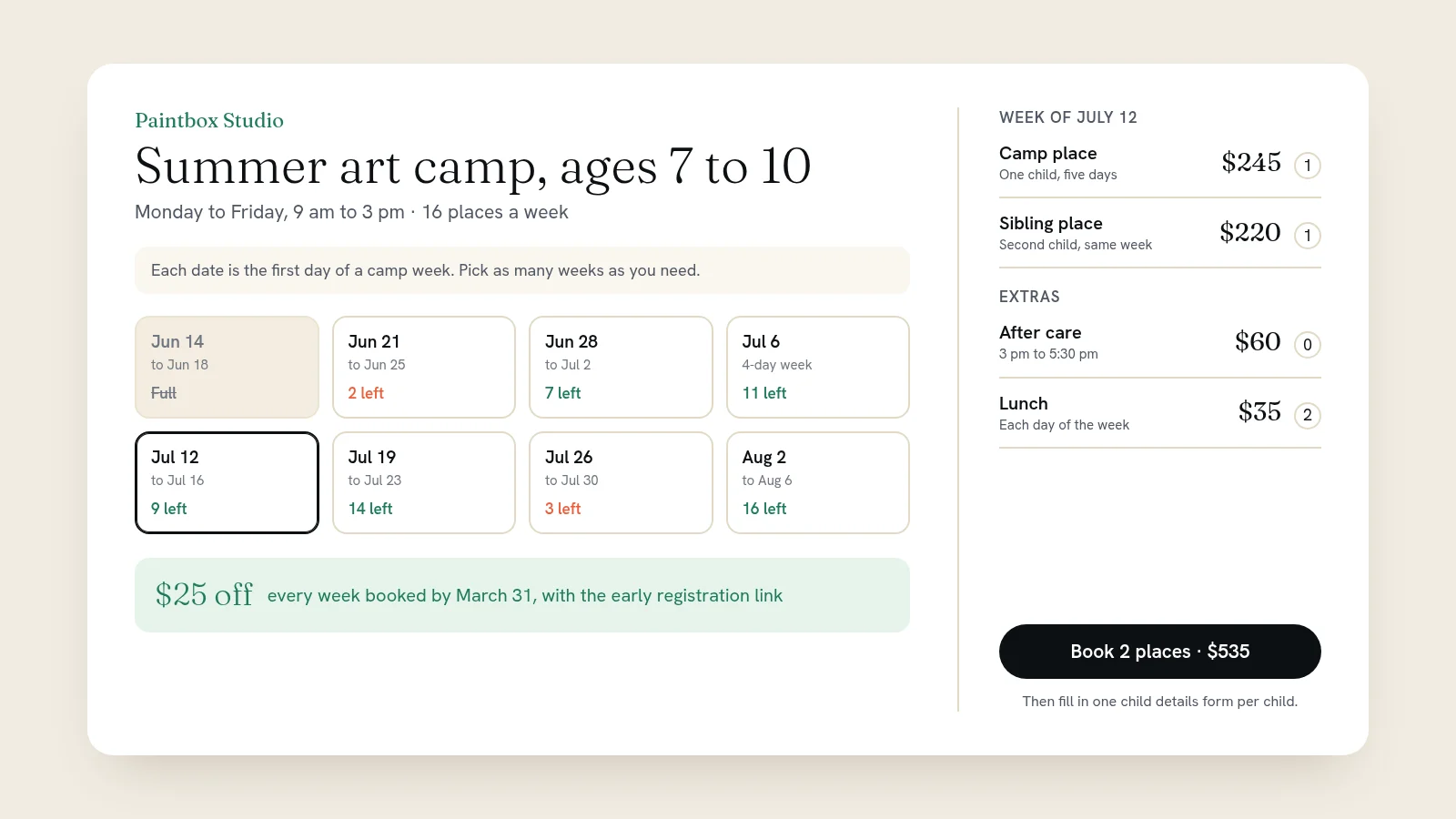
To take summer camp registrations online, make each camp week a bookable session with a set number of places, sell one place per child, and take payment when parents book: in full, or as a deposit with the rest due before camp starts. Offer a sibling price and an early registration price, add before and after care as extras, and collect each child's details (allergies, medical needs, emergency contacts, who can pick them up) in a short form parents fill in after booking. Parents get a confirmation straight away, and you get a list of who's coming each week.
Set up each week as a session
Parents think in weeks: "Can she do weeks two and five?" So make each week its own bookable date, with its own places, and let parents book the weeks they need.
- Places per week come from your staff and space. If you have two counsellors and your ratio is one to eight, that's 16 places. Ratios for day camps are set by state licensing rules and by the camp's own standards, so check yours.
- Age groups that do different activities in different rooms are best as separate camps, each with its own places. If they're together, one camp with a single place count is simpler.
- Short weeks, such as a holiday week, need their own price and a note on the page.
- Daily drop-ins can sit alongside the weeks as a separate session for families who only need a day or two.
Price places, siblings and early registration
Price per child per week, and keep the options few. A typical structure, with example numbers:
| What | Example price | How it works |
|---|---|---|
| Camp place | $245 a week | One child, Monday to Friday, 9 am to 3 pm |
| Sibling place | $220 a week | For a second child from the same family in the same week |
| Early registration | $25 off a week | For weeks booked before a date you set |
| After care | $60 a week | 3 pm to 5:30 pm, only with a camp place |
| Lunch | $35 a week | Only with a camp place |
Early prices fill your first weeks and tell you early which weeks need more promotion. End them on the date you announced. If you extend, parents learn to wait next year. A discount for booking the whole summer suits camps where most children come for many weeks; a discount code that only works above a set spend does that without another price to explain.
Deposit or full payment
Taking the full price at booking is simplest for you and for parents, and it's what we'd suggest for short classes. For camps that open registration months ahead, a deposit lowers the first payment and still holds the place. Our guide to taking deposits covers the wording and refund rules in detail. For a camp, the usual pattern is:
- A deposit per child per week, such as $75, when parents book.
- The balance, here $170, due by a fixed date, such as two weeks before the week starts.
- A clear line on what happens if the balance isn't paid: the place is released and the deposit is kept, or refunded, as your policy says.
Two payments mean two card fees and some chasing. On Quick Elements' rate of 3.99% + 30¢ a sale, paying $245 at once costs $10.08 in fees, while a $75 deposit and a $170 balance cost $3.29 and $7.08. The difference is small. The chasing is the real cost, so use deposits only if your families need them.
Collect the details you need for each child
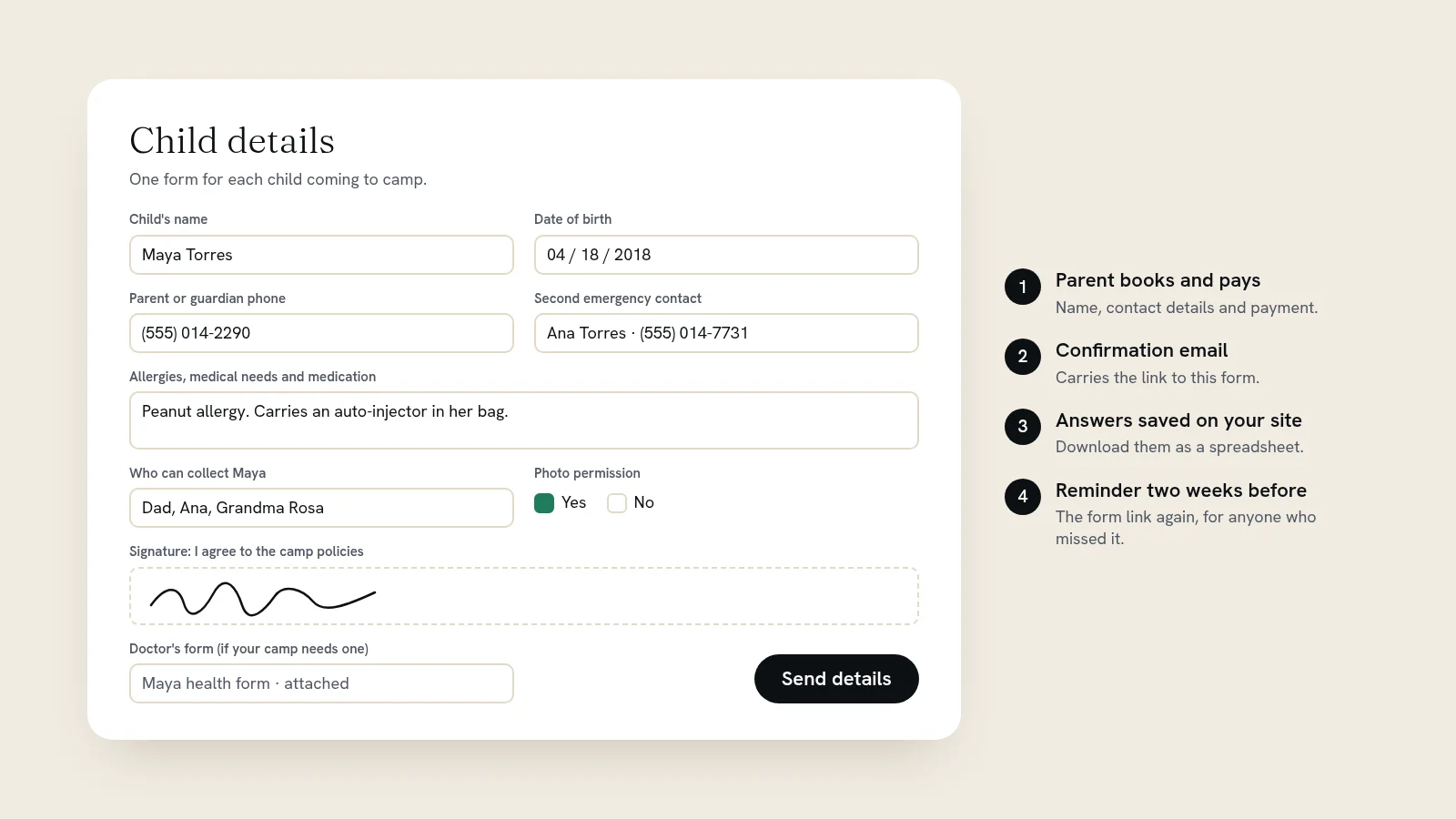
A camp needs far more than a name and an email. Before a child's first day, you should have:
- The child's name, date of birth and, if it matters for groups, their school grade.
- Parent or guardian names and phone numbers, plus a second emergency contact.
- Allergies, medical conditions and any medication your staff may need to give.
- Who is allowed to pick the child up, and who isn't.
- Permission for photos, outings, sunscreen or swimming, as your program needs.
- A signature agreeing to your camp policies.
Only ask for what you'll use, and store it where only staff who need it can see it. Medical details are sensitive, and some states and countries have rules about how children's information is kept, so check yours.
On Quick Elements, booking takes the parent's name and contact details and payment, but it doesn't ask extra questions about each child. The honest way to collect them is a separate form. Build a child details form once, with a signature box for your policies and a file upload if you need a doctor's form, then put its link in the confirmation email every parent receives, asking for one form per child. Answers are saved on your site and you can download them as a spreadsheet. A reminder email two weeks before each week, with the form link again, catches the parents who didn't get to it. Before a week starts, check the forms against that week's booking list and call anyone missing.
Licensing, safety and policies
Rules for day camps vary by state and country. Some require a childcare or camp license, staff background checks, first aid certification or particular staff ratios, and some exempt short or part-day programs. Ask your state's childcare licensing office before you open registration. This is general guidance, not legal advice.
Write your refund policy before the first booking, and put a one-line version on the registration page. For example:
Cancel by May 1 for a full refund. After May 1, we'll move your child to another week with space, or refund 50%. Within two weeks of the start date, places can't be refunded, but can be swapped to a sibling. If we cancel a week, you'll get a full refund.
For more on choosing the numbers, see how to write a cancellation policy.
Setting up camp registration on Quick Elements
- Create the camp as a bookable event with chosen dates: the Monday of each camp week, with one time slot from 9 am to 3 pm. Write in the note above the dates that each date is the Monday a five-day week starts.
- Add a camp place and a sibling place as two types, each with its own price, and set the number of places per week. If siblings should come out of the same 16 places, put both types in one shared capacity.
- Add after care and lunch as extras that can only be bought with a place.
- Set a different price or number of places for any week that needs it, such as a four-day holiday week.
- Create your early registration discount code with an end date, and share the link that applies it by itself.
- Write the confirmation email with the child details form link, a reminder two weeks before with the link again, and a reminder the Friday before with drop-off times and what to pack.
Each week shows how many places are left and stops taking bookings when it's full. Every registration lands in one list you can filter by week, and if a family's plans change, you can move their booking to another week from that list. A family who pays at the front desk can be booked in by hand, and their place comes out of the same count. For full weeks, our guide to running a waitlist shows how to fill the places that open up.
The kids' art class design already sells places with a separate sibling price, which is a quick starting point for a camp site. Your next step: write down your weeks, places and prices, and draft the child details form before anything else. It's the part parents notice when it's missing.