
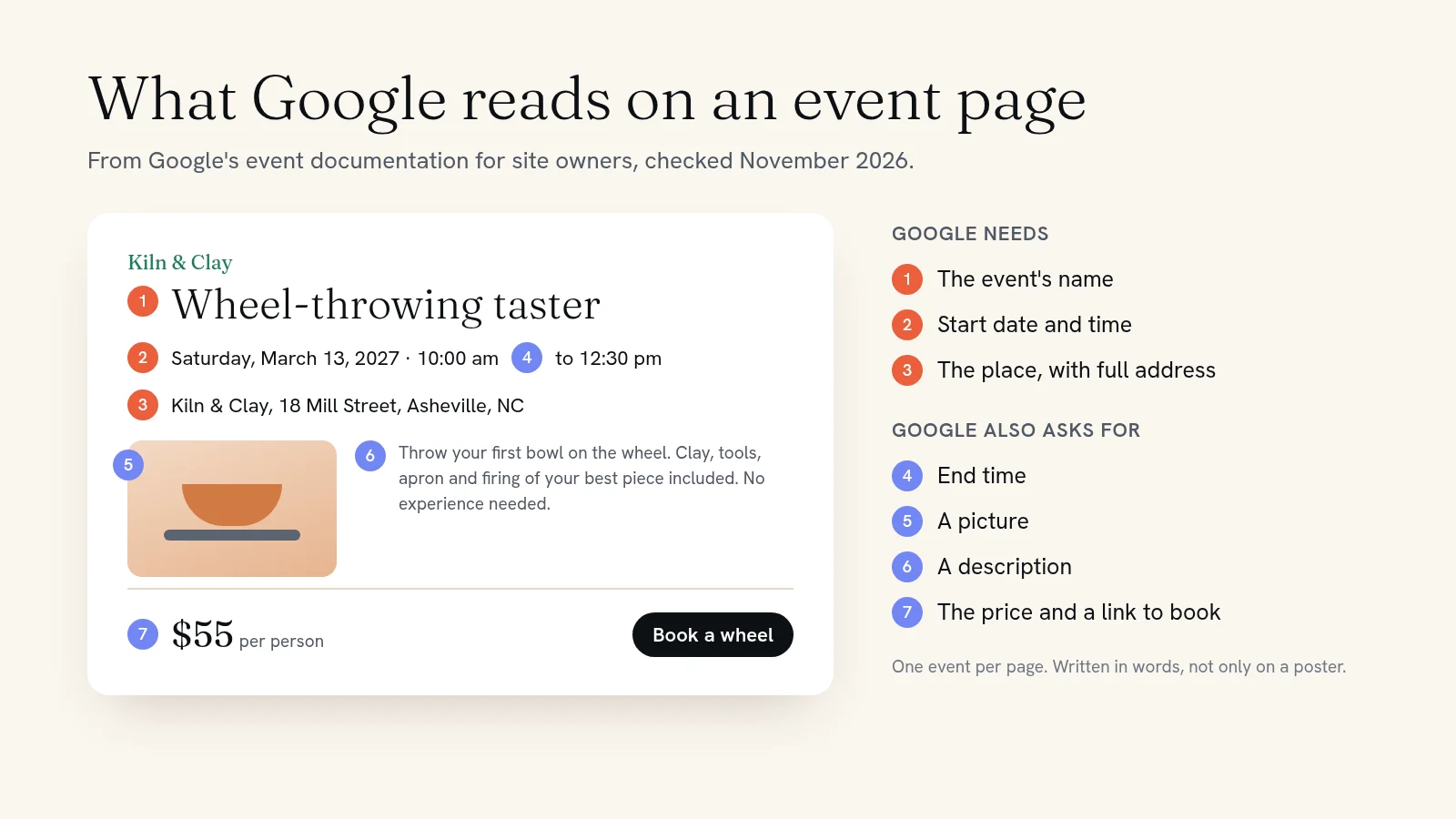
To get your event on Google, give it a page of its own on your website with the name, date, start time, full street address and price written out in plain words. Then add it as an event post on your Google Business Profile, and list it on a ticketing or listings site that already sends its events to Google. Those three steps cover the three places an event can appear: ordinary search results, your profile on Search and Maps, and Google's own list of upcoming events.
That last one is the list most people mean when they ask how to get an event to show up on Google, and it's the one with the most rules. Here is how it works, what you can do whatever website you use, and what to check when your event still isn't there.
Three ways an event shows up on Google
- Ordinary search results. Your event page appears for a search like "pottery class Asheville", the same way any other page does.
- Google's event listings. A list of upcoming events with dates, places and ticket links that appears for searches such as "comedy this weekend". Google builds it from event pages that carry extra event details it can read, and from ticketing and social platforms that send their events to Google.
- Your Google Business Profile. Event posts appear on your profile in Search and on Maps, where people already look you up.
You control the first and third completely. The second depends on how your event is published.
How Google's event listings work
Google explains its rules in its event documentation for site owners (checked November 2026). The parts that matter to an organizer:
- Every event needs a page of its own. A page listing twenty events doesn't count as twenty events.
- Google must be able to read the event's name, its start date and time, and the place with a full address. It also asks for the end time, a description, a picture, the price with a link to buy, and who is running it.
- Some things aren't accepted: business hours dressed up as events, coupons and vouchers, events that need a membership or an invitation before anyone can buy a ticket, school events where the performers and the audience are mostly children on school grounds, and online events with no in-person part.
- The listings run in the US, the UK, Canada, Australia, India, Germany, Brazil, Spain and Latin America.
- Google doesn't guarantee that any event will be shown, even one that follows every rule.
Google offers three ways in. You can post the event on a ticketing or social platform that already works with Google. You can use a website that writes those event details into each event page for you, out of sight of visitors (Google calls this structured data). Or you can add them to the page yourself if you edit your site's code.
If your website doesn't add those details, you can still get your events on Google. They'll appear in ordinary results and on your profile, and you can reach the event listings through a platform that feeds them. The steps below work either way.
Step 1: Give every event its own page
This is the step that helps everywhere: in ordinary results, in the event listings when a platform or your site feeds them, and as the place your profile's button sends people.
- One page per event. A weekly class or a show that repeats can keep one page with all its dates. A one-off night gets its own.
- A title that says what and where. "Thursday stand-up comedy in Leeds" tells Google and the reader more than "Laughs Night Vol. 4".
- The details in words, not only on a poster. Write "Saturday, March 13, 7 pm to 9:30 pm" and the full street address in the text of the page. A flyer image with the date on it is invisible to search.
- The price and a way to book on the same page, so a visitor from Google can act without hunting.
- Links to it from your home page and your events list, so Google finds it quickly.
Publish the page as soon as the date is set. A new page can take days to show up in search. Google's free Search Console lets you ask Google to look at a new page sooner.
Step 2: Post it on your Google Business Profile
If you have a verified profile, you can add posts to it, and one kind of post is an event. According to Google's help page on posts (checked November 2026):
- An event post has a title and start and end dates and times, plus an optional description, photo or video, and a button.
- If you leave out the times, Google shows the event as lasting 24 hours on its dates, so always add them.
- The button should lead to a page where people can do what it says. Point it at the event's own page, not your home page.
- Google says posts about events may be featured automatically on your profile on phones.
Event posts show on your profile, not in Google's general event listings, but your profile is what people see when they search for you by name or find you on Maps. If you aren't set up yet, our guide on getting your business on Google Maps takes you through creating and verifying a profile.
Step 3: List it where Google already looks
Some ticketing and listings platforms send their events to Google directly. Google doesn't publish a complete list of them. Its own suggestion is to search Google for a popular event on that platform and see whether it appears in the event listings. If it does, your event on the same platform has the same chance.
The trade-off is the platform's fee. Eventbrite, for example, charges nothing for free events, and US organizers pay 3.7% + $1.79 per paid ticket plus 2.9% payment processing (from Eventbrite's pricing page, checked November 2026). For a free talk or open day, that's free reach. For paid tickets, many organizers list their biggest nights there and sell everything else from their own site. Our breakdown of what Eventbrite's fees take from a ticket shows the numbers.
Also send your event to the local calendars people check: the town or tourism board's what's-on page, the local paper, radio stations, the library and the chamber of commerce. Whether each one feeds Google's listings varies, but every listing is a link back to your page, and links help with the next step.
Step 4: Get the page found in ordinary search
People who don't know you yet don't search for your event's name. They search for the activity and the place: "paint and sip near me", "kids pottery class Saturday", "jazz tonight Portland". To come up for those:
- Use the words people search with in the page title and the first lines of the description, including the town or neighborhood.
- Point your Business Profile's website link at your events page if events are most of what you do.
- Ask the venue, the performers and any partners to link to the event page rather than to a social post.
- Collect reviews on your Business Profile after each event. Reviews help your profile rank for local searches.
The rest is the same work that gets any small business found, which our guide to showing up first on Google covers.
Why your event isn't showing up on Google
- The page is new, or nothing links to it yet.
- The date, time and address are only in a picture.
- The page lists many events instead of one.
- There's no street address, because the event is online only.
- It needs a membership or an invitation before anyone can buy.
- The platform you listed it on doesn't send its events to Google.
- The page still shows a date that has passed.
- Google chose not to show it. It doesn't promise to show every eligible event.
Events on a Quick Elements site
On Quick Elements, every event, class or tour gets its own page on your web address, in your design. The page shows the dates and times, the place (with a map if you want one), each ticket price, and how many places are left, and visitors can book and pay there. Your site also gets an events list visitors can filter and a monthly calendar, so every event page is linked from somewhere Google will find it. Selling costs 3.99% + 30¢ per card sale with card processing included, and nothing is added to your buyer's total.
To be clear about one thing: Quick Elements event pages don't yet add the hidden event details Google's event listings read. They appear in ordinary search like any other page. To reach the listings and Maps today, post each event on your Business Profile with its button pointing at your event page, and list the events where reach matters most on a platform that feeds Google.
Start with your next event. Write its date, time, address and price into the page in plain words, then add it as an event post on your Business Profile today. If you're choosing where to sell, see how event pages work on Quick Elements.